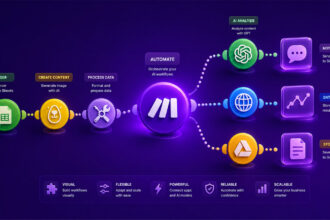
I used to think AI automation meant either hiring a developer or spending evenings fighting with API docs. Then I built a simple workflow that took a messy client inquiry, summarized it, classified the request, and sent it to the right place automatically. No code. No drama.
That is where no-code AI workflow automation becomes genuinely useful: it gives freelancers, marketers, indie makers, and small teams a practical way to automate complex work without turning every idea into a technical project.
The power of no-code AI workflow automation for non-developers
No-code AI workflow automation changes the starting point for freelancers, marketers, indie makers, and small teams. Instead of asking, “Can we afford a developer for this?”, the better question becomes, “Can we map the process clearly enough to automate it?”
That shift matters.
A no-code AI workflow connects your everyday tools, adds an AI step, and runs a task without manual effort. You might take a new form submission, summarize it with AI, classify the lead, then send the result to your CRM or Slack. No backend setup. No custom scripts. No “I’ll ask the technical person” bottleneck.
The real power is not just speed. It is ownership. When you can build AI workflows without coding, you can test ideas quickly, fix broken steps yourself, and improve your systems as your work changes. For small businesses, this fits naturally into the broader promise of AI workflow automation for lean business operations: doing more with fewer moving parts, without turning every process improvement into a technical project.
Deconstructing no-code AI workflows: key components explained
A no-code AI workflow is usually made of four core pieces: a trigger, one or more actions, optional conditions, and an AI model step. Once you understand those parts, most visual automation software becomes much less intimidating.
The trigger is what starts the workflow. It could be a new email, a completed Typeform response, a new row in Google Sheets, a new support ticket, or a webhook from another app. Think of it as the “when this happens” part of the system.
Actions are what happen next. An action might create a task, update a database, send a message, draft a reply, generate a summary, or move information into another tool. In a simple workflow, the action follows the trigger directly. In a more useful workflow, AI sits between them and makes a decision.
Conditions add logic. They tell the workflow to take different paths depending on the data. For example, if a lead mentions “enterprise,” the workflow can send it to sales. If the message looks like a support complaint, it can route it to customer success.
The AI step is where the workflow becomes more than basic automation. It can summarize text, extract fields, classify intent, rewrite copy, detect urgency, generate draft responses, or transform messy input into structured output.
Here is a simple way to see the pieces together:
| Component | Role | Example |
|---|---|---|
| Trigger | Starts workflow | New form response |
| AI step | Interprets data | Classify lead intent |
| Condition | Chooses path | High-value lead |
| Action | Completes task | Create CRM deal |
Nothing magical is happening behind the scenes. The builder simply lets you arrange these blocks visually, then passes data from one step to the next.
Selecting the ideal no-code AI workflow builder for your needs
The best no-code AI workflow builder is not always the one with the longest feature list. In practice, the right choice depends on how you think, how complex your workflows are, and how much control you need when things get messy.
For a solo marketer, ease of use might matter more than advanced branching. For a SaaS team, error handling, webhooks, API support, and reusable workflow logic might be non-negotiable. A freelancer may care most about client-friendly setup, fast templates, and predictable pricing.
I usually look at four factors before committing to a platform:
- Choose a builder that matches your technical comfort, not just your ambition.
- Check whether it connects with the tools you already use every week.
- Look closely at AI features, including prompts, model options, structured outputs, and approval steps.
- Review pricing based on real workflow volume, not the cheapest starter plan.
Some tools lean toward visual flexibility. Make.com, for example, is useful when you want to map multi-step workflows with a clear visual structure, which is why it fits well for teams exploring flexible visual AI workflow building. Relay.app takes a more language-first approach, helping users describe workflows in plain English and turn them into automations, a good fit if you want plain-English AI workflow setup. n8n is more technical, but it gives stronger control when teams need custom logic, self-hosting, or deeper integrations, especially for those comparing advanced AI automation control with n8n.
The mistake I see often is choosing a tool because it looks powerful, then building nothing because it feels heavy.
A better approach is to pick based on your first three workflows. If the platform makes those easy, you can grow from there. No-code automation tools should reduce friction, not become another system you avoid opening.
A step-by-step guide to building your first no-code AI workflow
Your first workflow should be boring in the best possible way. Pick a task you already repeat often, with clear input and a clear output. Lead qualification, content summarization, email triage, and support ticket routing are all good starting points.
For this example, imagine you want to process new inquiry form submissions. The workflow will read the message, summarize it, classify the request, and send the result to your team.
Start with one clear trigger
Choose the event that should launch the automation. In this case, the trigger is a new form submission. That could come from Typeform, Tally, Webflow, Google Forms, or any tool your builder supports.
Keep the trigger narrow. “Every new message from everywhere” sounds efficient, but it can create chaos fast. “New pricing inquiry from the website contact form” is easier to test, debug, and trust.
At this stage, map the fields you need. You might use name, email, company, message, budget, and source. Clean inputs create cleaner AI outputs. That part is not glamorous, but it saves a surprising amount of frustration later.
Add the AI interpretation step
Next, add an AI step that turns the raw message into something useful. You can ask the model to summarize the request, identify the intent, estimate urgency, and assign a category.
A simple prompt placeholder might look like this:
The key is to ask for structured output. Freeform AI responses are nice to read, but structured fields are easier to use in automation. If your next step depends on urgency or category, the workflow needs predictable values.
Do not overcomplicate the first prompt. You can refine it after seeing real examples.
Route the result to the right action
Once the AI has classified the inquiry, define what happens next. A sales inquiry could create a deal in your CRM. A support request could become a ticket. A partnership message could go to a specific Slack channel.
This is where conditions help. Your workflow might say:
- If the category is sales, create a CRM lead and notify the sales channel.
- If the category is support, create a helpdesk ticket and mark the priority.
- If the urgency is high, send an immediate internal alert.
Test with five to ten real or realistic submissions before trusting the automation. Try short messages, messy messages, vague messages, and edge cases. AI workflows behave best when they have been tested against the kind of imperfect input humans actually send.
After that, turn it on quietly. Monitor the first few runs, adjust the prompt, then expand only when the workflow feels stable.
Practical applications: real-world no-code AI workflow examples
No-code AI workflow automation becomes more interesting when you stop thinking about “AI tasks” and start looking at annoying handoffs. Anywhere information arrives messy, needs interpretation, then moves somewhere else, there is probably a useful workflow waiting.
For marketers, AI workflows can turn campaign data into weekly summaries, repurpose webinar transcripts into content briefs, or classify inbound leads by intent. A small content team could collect new blog ideas from a form, score them against SEO criteria, generate a brief, and send approved ideas into a project board.
Freelancers can use workflows to reduce admin drag. A new client intake form can be summarized, scoped, tagged by project type, and turned into a draft proposal outline. Not perfect, of course. But good enough to remove the blank-page moment.
SaaS builders might use AI workflows for support triage, churn signals, onboarding personalization, or product feedback analysis. For example, every new support ticket can be classified by bug, feature request, billing issue, or usability question. The workflow can then route it to the right place and create a short internal summary.
Here are a few practical patterns:
| Use case | AI task | Final action |
|---|---|---|
| Lead intake | Score intent | Create CRM deal |
| Support tickets | Classify issue | Assign priority |
| Content ops | Summarize notes | Create brief |
| Customer feedback | Detect themes | Update roadmap board |
The best workflows are not always flashy. Sometimes the most valuable automation is the one that saves twenty minutes every morning and prevents three small mistakes before lunch.
Optimizing and maintaining your no-code AI workflows
A workflow is not finished when it runs once. That is just the first polite handshake.
The maintenance work starts when real data enters the system. People write vague emails, forms get skipped, tools change their fields, and AI outputs sometimes drift from what you expected. No big drama, but you need a habit of checking.
Start by reviewing failed runs and unexpected outputs. Most no-code automation tools show logs, step history, and error messages. Use those logs to find weak points. Maybe the trigger is too broad. Maybe the prompt needs stricter output formatting. Maybe the workflow needs a human approval step before sending anything external.
Version control can be simple. Before making major changes, duplicate the workflow or document what you changed. I like keeping a small note with the workflow goal, trigger, key prompt, connected apps, and known edge cases. Future-you will appreciate it.
Optimization usually means removing friction, not adding complexity. Shorten prompts when possible. Reduce unnecessary steps. Add conditions only where they protect quality. As volume grows, separate large workflows into smaller ones so each automation has a clear job.
Monitor cost, too. AI steps can become expensive if they process every tiny event without filtering. A basic condition before the AI step can prevent wasted runs.
Reliable no-code AI workflows feel calm. They do not need constant attention, but they do need occasional care, especially as your business, tools, and customers evolve.
Building no-code AI workflows is not about replacing every manual task overnight. It is about noticing the small repeated steps that slow you down, then turning them into systems you can actually control, test, and improve without waiting on a developer.
For small teams, that is a powerful shift. The tools will keep evolving, but the real advantage comes from learning how to think in workflows. Start with one useful automation, keep it simple, and let the next improvement reveal itself as you work. What repetitive task would you automate first?
FAQ
What is no-code AI workflow automation?
No-code AI workflow automation allows individuals and businesses to design and implement automated processes incorporating artificial intelligence, all without writing a single line of code. It uses visual interfaces and pre-built connectors.
Can I really build AI workflows without a developer?
Yes, absolutely. Modern no-code platforms provide intuitive drag-and-drop interfaces and pre-configured AI integrations, empowering non-technical users to create sophisticated AI workflows independently.
What kind of tasks can no-code AI workflows automate?
No-code AI workflows can automate a wide range of tasks, including data extraction, content generation, customer support responses, lead qualification, sentiment analysis, image recognition, and more, across various business functions.
What are some popular no-code tools for AI workflow automation?
Popular tools include Make.com, Relay.app, and n8n, which offer visual builders and extensive integrations to connect different applications and AI services without coding.
Is no-code AI automation suitable for small businesses?
Yes, it’s particularly beneficial for small businesses as it democratizes access to AI, reduces reliance on expensive developers, and allows rapid prototyping and deployment of AI-powered solutions to improve efficiency and customer experience.

Artificial Intelligence Specialist | AI-Driven Workflow Strategist