
AI search visibility is getting harder to track with a few manual checks. A potential customer might ask ChatGPT for software recommendations, use Perplexity to research a problem, or rely on an AI-generated search summary without ever reaching a traditional results page. Search is no longer happening in one place, and visibility now depends on whether AI systems mention, cite, summarize, or recommend your content.
That shift makes specialized monitoring much more important. A brand can rank well in Google and still be almost invisible in AI-generated answers, while another site may earn frequent citations without dominating conventional rankings. Once you are tracking multiple queries, platforms, and markets, manual checks become unreliable and tedious. MCP AI search visibility monitoring gives you a more repeatable approach by connecting an AI agent to live visibility data, automating recurring checks, and surfacing the changes that actually deserve attention.
The evolving landscape of AI search and why monitoring matters
Search visibility is no longer limited to where a page ranks in a familiar list of blue links. A potential customer might ask ChatGPT for software recommendations, use Perplexity to research a problem, or rely on an AI-generated search summary without clicking a traditional result at all.
That changes what “visible” actually means.
A page can rank well in Google and still be almost absent from AI-generated answers. The reverse can happen too: a relatively modest page may become a frequently cited source because its structure, topical depth, or supporting evidence makes it useful to an LLM.
Traditional rank tracking does not capture that reliably. It tells you where URLs rank for keywords, but usually not whether an AI system mentions your brand, cites your pages, recommends a competitor instead, or changes its answer across repeated queries.
This is where MCP AI search visibility monitoring becomes useful. Rather than manually testing dozens of prompts across multiple interfaces, you can connect an AI agent to live data sources and turn those checks into a repeatable monitoring workflow.
For the broader architecture behind those connections, connecting AI agents to live SEO data with MCP provides the foundation. Here, the focus is narrower: using that architecture specifically to monitor AI search visibility.
Understanding MCP’s role in AI search visibility monitoring
MCP, or Model Context Protocol, gives an AI agent a standardized way to interact with external tools and data sources. In an SEO monitoring setup, that means the agent is not limited to whatever information already exists inside its model context. It can request fresh visibility data, run predefined checks, retrieve historical records, and pass results into another part of your workflow.
If you want to understand how this works beyond visibility tracking, this broader guide to connecting AI agents with live SEO data through MCP explains how SEO MCP servers give agents access to external data and tools.
Without an external data connection, asking an AI assistant, “How visible is my brand in AI search?” is mostly an analysis exercise. With an AI visibility MCP integration, the same assistant can become an operational monitoring layer working with actual measurements.
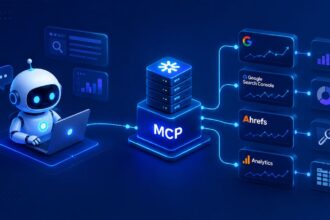
The basic architecture looks like this:
| Layer | Role | Example |
|---|---|---|
| AI agent | Interprets monitoring tasks | Checks brand visibility |
| MCP server | Connects agent and data | Exposes visibility tools |
| Data source | Returns live measurements | Mentions, citations, rankings |
The agent can combine several small operations into one monitoring routine. It might retrieve the latest tracked queries, identify which prompts lost citations, compare your visibility with competitors, and summarize the meaningful changes.
That is closer to having a lightweight AI search monitoring analyst than simply running another dashboard. MCP also makes the workflow easier to extend later with rankings, backlinks, content inventory data, or analytics without rebuilding the entire integration.
Step-by-step: Automating your MCP AI search monitoring agent setup
A useful monitoring agent starts with a narrow job description. I would avoid giving it a vague instruction such as “monitor our AI SEO.” The agent needs measurable questions, otherwise you end up automating inconsistent checks.
Define what the agent should monitor
Start by deciding what counts as visibility for your project. For most sites, I would track a small combination rather than a single metric.
Useful monitoring signals include:
- Whether your brand appears in responses for priority queries.
- Whether a specific page is cited or referenced.
- Which competitors appear when your brand does not.
- How frequently your brand appears across tracked prompts.
- Whether the wording or positioning of mentions changes over time.
Next, create a stable query set. AI outputs are variable, so constantly changing the prompts makes period-to-period comparisons messy.
For a SaaS product, for example, you might track commercial prompts such as “best tools for automated customer reporting,” problem-aware prompts such as “how to automate client reporting,” and comparison prompts involving your category.
A focused list of 20 meaningful prompts is usually more useful than hundreds of loosely related queries.
Connect the monitoring source through MCP
The exact configuration depends on the MCP server and visibility platform you use, but the pattern stays similar. Your MCP client needs access to the relevant server, and the agent needs permission to call the tools exposed by that server.
Once connected, inspect what the available tools actually return. You might have access to prompt-level visibility, citations, brand mentions, competitor share, model-specific results, or historical comparisons.
Do not automate everything immediately.
I prefer to test one complete monitoring request manually first. Ask the agent to retrieve visibility for five tracked queries, compare current values with the previous observation, and highlight meaningful changes. If that output is genuinely useful, it is ready to schedule.
For a concrete implementation using one visibility provider, tracking AI search visibility with Writesonic MCP goes deeper into the tool-specific setup.
Turn the checks into a scheduled workflow
Once the request works consistently, give the agent a recurring schedule through your automation environment.
Weekly monitoring is a sensible starting point for many sites. Daily checks can create unnecessary noise because AI-generated answers naturally fluctuate, while monthly checks may hide changes for too long.
A simple automated run could follow this sequence:
- Load the approved list of AI search prompts.
- Retrieve current visibility data through MCP.
- Compare results with the previous monitoring period.
- Flag significant gains, losses, and new competitor mentions.
- Store the new snapshot in your reporting system.
- Generate a short summary for review.
The important word here is “significant.” Your agent should not alert you every time one response changes slightly. Define thresholds wherever your data allows it, or instruct the agent to prioritize repeated patterns over isolated fluctuations.
That keeps the automation useful instead of turning it into another notification stream you eventually ignore.
Advanced automation: GEO and LLM visibility monitoring with MCP
Once the basic workflow is stable, you can start segmenting visibility instead of treating AI search as one universal channel.
That is where GEO monitoring automation becomes much more useful.
Segment monitoring by market and model
Location can affect the products, sources, companies, and recommendations surfaced in AI-assisted search experiences. If your business targets several countries or regions, an overall visibility score can hide meaningful differences.
Instead, create monitoring groups around the markets that actually matter commercially.
| Dimension | Useful segmentation | What it reveals |
|---|---|---|
| Location | US, UK, Canada | Regional visibility gaps |
| LLM | ChatGPT, Perplexity, Gemini | Platform differences |
| Intent | Research, comparison, purchase | Funnel-level visibility |
An MCP-enabled agent can run the same query group against the available location or platform dimensions and compare the outputs automatically.
LLM visibility monitoring with MCP follows the same logic. Instead of asking only, “Are we visible in AI search?”, you can ask more useful questions: Where are we most visible? Which model rarely references us? Which competitor dominates recommendation prompts? Are informational pages cited while product pages remain invisible?
Those distinctions usually lead to better content decisions.
You can also create exception-based monitoring, where the workflow surfaces only major visibility drops, new competitors appearing repeatedly, or important prompt categories where your brand disappears.
If you are choosing between different data sources for this kind of workflow, comparing Writesonic MCP and Semrush MCP for AI visibility monitoring can help clarify the trade-offs before you build too much automation around one provider.
Analyzing and actioning data from your automated MCP reports
Automated collection is useful only if it changes what you do next.
I would avoid obsessing over individual AI answers. LLM outputs can vary even when the underlying competitive landscape has barely changed. Patterns across multiple prompts and monitoring periods are far more informative.
If competitors consistently appear in recommendation queries where you do not, study what sources support those answers. If your brand receives mentions but few citations, investigate whether stronger supporting pages could make your site a more useful source. When one topic cluster gains visibility after a content update, compare what changed in its structure, evidence, internal linking, or topical coverage.
Your monitoring agent can help with the first pass by categorizing changes.
| Signal | Possible interpretation | Next action |
|---|---|---|
| Mentions rising | Brand relevance improving | Expand winning topics |
| Citations falling | Source preference changed | Review cited competitors |
| Regional gap | Weak local relevance | Strengthen market-specific content |
| Competitor surge | New authority signal | Analyze competing pages |
The agent should reduce the amount of data you need to inspect, not make SEO decisions on autopilot. Human review still matters when deciding whether a change represents noise, a genuine opportunity, or something worth rewriting content around.
Integrating automated MCP monitoring into your SEO workflow
The cleanest setup is to treat MCP AI search visibility monitoring as another feedback loop inside your existing SEO system, not as a separate discipline competing for attention.
Visibility changes can feed into content refreshes, competitor research, topic prioritization, digital PR, and technical SEO investigations. A monthly strategy review might combine ordinary rankings with AI citations and LLM mentions, while weekly automation flags only the changes that deserve attention sooner.
That combination is powerful because the monitoring remains continuous while your involvement stays selective.
Automating AI search visibility monitoring with MCP makes the process far more manageable. Instead of checking prompts manually and trying to remember what changed, you can build a repeatable system that captures shifts in mentions, citations, competitors, locations, and LLM performance as they happen.
The bigger opportunity is using those signals to improve your SEO decisions, not just collect more data. If you are already experimenting with AI visibility monitoring, I’d be curious to know which signals you find most useful in practice.

Artificial Intelligence Specialist | AI-Driven Workflow Strategist