An AI agent can analyze keywords, suggest content updates, and spot SEO opportunities in seconds. The problem is that its recommendations are only as useful as the data it can access.
If you are still exporting Search Console reports, copying ranking data, or feeding spreadsheets into prompts manually, the workflow is not really autonomous.
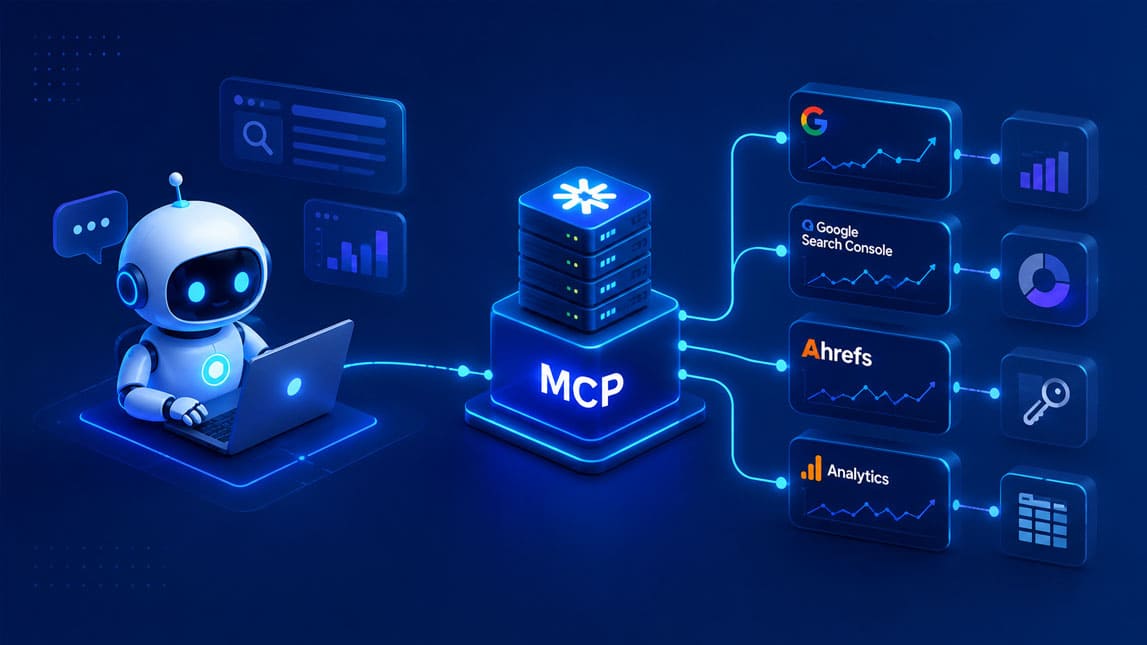
SEO MCP servers change that by giving AI agents a structured way to access live SEO data when they need it. Instead of working from static context, an agent can query performance metrics, SERP data, keyword information, or site signals directly and use them inside multi-step workflows. In this guide, we’ll look at how MCP for SEO works, how the underlying architecture fits together, and how to turn those connections into practical agentic SEO workflows.
What are SEO MCP servers and why they matter for AI agents?
Most AI SEO workflows have a hidden weaknesss: the model knows how to reason about SEO, but it does not automatically know what is happening on your site right now.
You can paste Search Console exports into a chat, upload a keyword spreadsheet, or manually provide ranking data. That works for occasional analysis. It becomes painful once you want an agent to monitor hundreds of pages, compare fresh metrics, investigate changes, and take actions without waiting for someone to prepare the context first.
SEO MCP servers solve that connection problem
An SEO MCP server is a service built around the Model Context Protocol that exposes SEO data and operations to an AI application in a structured way. Instead of giving an agent a static CSV, you give it controlled access to tools and data sources it can query when a task requires them.
The distinction matters. A normal LLM workflow might receive last week’s traffic report and generate recommendations from it. An MCP-enabled agent could request the current queries for a page, inspect its recent click trend, fetch relevant ranking information, compare the page with competitors, and then decide what deserves attention.
That turns SEO data from input you manually prepare into infrastructure the agent can use.
For freelancers and small teams, I think this is where MCP for SEO gets especially interesting. You do not necessarily need a giant autonomous SEO system. Even a relatively simple server can remove repetitive context-gathering work and make existing AI workflows much more useful.
The difference between common approaches is fairly clear:
| Approach | Data access | Best suited for |
|---|---|---|
| Manual AI chat | Copied or uploaded data | One-off analysis |
| API automation | Predefined API calls | Fixed workflows |
| SEO MCP server | Agent-selected live tools | Adaptive SEO workflows |
The real benefit is not simply “AI plus SEO API.” It is giving the model a predictable interface through which it can discover available capabilities, request the information it needs, and combine several SEO operations while working toward a larger objective.
The Model Context Protocol (MCP): bridging AI and live SEO data
The Model Context Protocol is an open standard for connecting AI applications with external data and tools. Rather than building a different custom integration for every model, agent, and data source, developers can expose capabilities through a common protocol that MCP-compatible applications understand.
That separation is useful for SEO because the ecosystem is fragmented.
Your organic performance might live in Google Search Console. Analytics data may come from another platform. Rankings might come from a dedicated SERP API. Crawl information could sit in a database or technical SEO service. Content metadata may live in your CMS.
Without an interoperability layer, the agent needs custom logic for every connection.
With Model Context Protocol SEO infrastructure, those systems can sit behind one MCP server. The AI application does not need to understand the implementation details of every upstream API. It needs to understand the MCP capabilities the server exposes.
Current MCP implementations revolve heavily around tools, resources, and structured schemas. In the July 28, 2026 specification, the protocol also moved toward a stateless core for remote deployments, making MCP servers easier to operate using conventional HTTP infrastructure.
For an SEO workflow, those primitives might represent different types of access:
| MCP capability | SEO example | Agent use |
|---|---|---|
| Tool | Fetch query metrics | Run an analysis |
| Resource | Site configuration | Read persistent context |
| Structured schema | Keyword metric fields | Interpret results reliably |
Imagine an agent receives the instruction: “Find pages losing organic visibility and identify the most likely content opportunities.”
The model does not need every metric dumped into its context beforehand. It can first request declining URLs, inspect queries for the affected pages, retrieve current SERP information only for promising keywords, and then decide which pages warrant deeper analysis.
That selective access is important. SEO datasets get large very quickly, while LLM context is something you want to use deliberately.
MCP also creates a useful boundary between reasoning and execution. The model decides what information it needs. The server decides how that information is retrieved, validated, authorized, formatted, and returned.
In practice, that boundary makes agentic SEO workflows easier to maintain than stuffing API calls directly into prompts or creating a separate integration for every experiment.
Core components and architecture of an SEO MCP server
A useful SEO MCP server does more than forward requests from an AI model to an API. You usually need several layers between the agent and the underlying SEO services.
At the top sits the MCP client or host: the AI application where the agent operates. The server then exposes a defined catalog of capabilities. Behind that interface are your connectors, processing logic, authentication, and external SEO data sources.
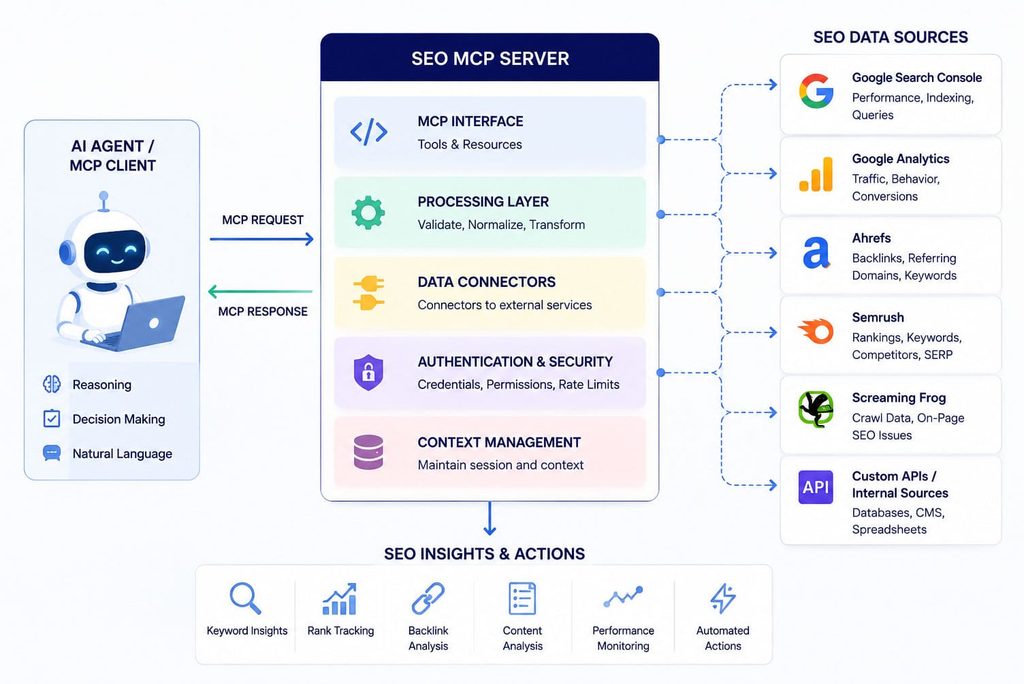
A simplified architecture looks like this:
| Layer | Responsibility | Example |
|---|---|---|
| AI host | Runs agent reasoning | Agent application |
| MCP interface | Exposes SEO capabilities | Tools and resources |
| Processing layer | Validates and transforms data | Metric normalization |
| Data connectors | Calls external services | Search Console API |
| Data sources | Provides live SEO information | SERP or crawl data |
Data connectors are the pieces that communicate with your actual sources. One connector might retrieve Google Search Console performance data. Another could request SERP results. A third could query your CMS, analytics platform, backlink provider, or internal keyword database.
I prefer keeping these integrations separate from the MCP tool definitions whenever possible. It makes the server much easier to change later. If you switch ranking providers, for example, the agent-facing tool can remain `get_keyword_rankings` while only the underlying connector changes.
The processing layer is equally important.
Raw APIs rarely return information in exactly the form an agent needs. One provider may call a metric `position`; another might return `rank`. Dates, URLs, countries, devices, keyword volumes, and pagination can all be represented differently.
Your server can normalize that mess before it reaches the model.
Suppose an agent calls a tool for page performance. Instead of returning an enormous upstream response, the processing layer might return URL, query, clicks, impressions, click-through rate, average position, comparison period, and percentage change. Cleaner data means less context consumption and fewer opportunities for the model to misinterpret irrelevant fields.
Tool design determines how effectively the agent can work with that information.
A vague tool called `seo_data` forces the model to guess what arguments matter. Smaller, clearly defined tools tend to produce more predictable workflows: `get_page_queries`, `compare_search_periods`, `fetch_serp_results`, or `get_indexation_status` communicate intent much better.
There is also a security boundary to think about. The agent should not automatically inherit unrestricted access to every connected system. API credentials belong on the server side, while permissions, rate limits, allowed properties, writable actions, and validation rules should restrict what each exposed capability can do.
That becomes particularly important once a workflow moves beyond reading data and starts modifying content or triggering actions.
Practical steps to set up and configure your SEO MCP server
You do not need to connect every SEO platform on day one. I would start with one useful workflow and design the server around it. A Search Console analysis agent is much easier to debug than an ambitious system simultaneously querying rankings, backlinks, analytics, crawl data, and a CMS.
Start with a narrow capability set
First, decide what your agent should actually be able to do
For a basic SEO MCP server, a sensible first version might expose:
- A tool that retrieves page-level organic performance for a selected period.
- A tool that retrieves the queries generating impressions for a URL.
- A tool that compares performance between two date ranges.
- A resource containing the site’s domain, market, language, and SEO settings.
Choose an MCP SDK that fits your stack, then create the server and define these capabilities with explicit input and output schemas. The official TypeScript SDK, for example, supports servers that expose tools and resources through MCP-compatible transports.
Next comes authentication with the external SEO source. Credentials should remain in your server environment rather than appearing in agent instructions. Your connector takes validated parameters from the MCP tool, makes the authorized API request, handles pagination or errors, and returns a normalized response.
For local experimentation, an MCP server can run alongside an AI application. Remote production deployments can use HTTP-based infrastructure, which is increasingly practical now that the 2026 MCP specification uses a stateless protocol core for remote requests.
Configuration deserves more attention than it usually gets. Define default properties, permitted domains, markets, date limits, maximum result counts, and reasonable rate limits before inviting an agent to make arbitrary queries.
Then test tools individually before testing autonomous workflows.
A tool should behave predictably with normal input, empty datasets, unavailable APIs, invalid URLs, unsupported properties, and rate-limit responses. If the server behaves inconsistently, the agent will often compensate by making additional calls, which can make a simple failure surprisingly expensive.
For keyword-focused implementations, the next layer is letting agents decide which metrics and keyword sets to investigate. I cover that process separately in using MCP for AI-powered keyword research, where the workflow can go deeper without turning the server setup itself into a keyword research tutorial.
Implementing AI agent SEO tools with your MCP server
Once the server works reliably, the interesting part is connecting it to an agent that can reason across several SEO tools instead of calling each one mechanically.
Map tools to decisions, not just APIs
This is one of the design choices that makes the biggest difference.
If your upstream provider has 40 API endpoints, exposing 40 nearly identical MCP tools is rarely the best solution. Think about the decisions the agent needs to make, then shape tools around those decisions.
An agent investigating a page decline might need to:
- Compare clicks and impressions between two periods.
- Identify queries with the largest visibility losses.
- Inspect current SERP competitors for selected queries.
- Retrieve the page’s title, headings, and last update date.
- Return optimization opportunities backed by the collected evidence.
The agent can orchestrate those calls dynamically. A page with falling impressions may require a different investigation from one where impressions increased but CTR collapsed.
That adaptability is where AI agent SEO tools become more interesting than traditional linear automation.
Data mapping matters here too. Keep names and formats consistent across tools. If one tool identifies pages with `url` while another expects `page_address`, you are creating unnecessary translation work for the model. Standardize URLs, timestamps, keyword strings, country codes, and key metrics at the server layer.
Descriptions should also tell the model when a tool is appropriate, what its inputs represent, and what the result means. MCP gives you a structured interface, but a poorly described tool can still lead to poor choices.
I also like separating analysis tools from action tools.
Reading Search Console metrics is low risk. Updating an SEO title, publishing a page, modifying internal links, or changing a canonical tag is not. For actions with meaningful consequences, add stricter validation and human approval where appropriate rather than assuming that “agentic” must mean fully autonomous.
A content optimization agent, for example, could gather performance data, evaluate pages, and prepare recommendations automatically while requiring approval before sending changes to the CMS. If you want to build that layer in detail, automating SEO content optimization with MCP and AI agents covers the workflow more directly.
Observability becomes useful surprisingly early. Log which tools the agent calls, their parameters, latency, upstream failures, and result size. When an agent reaches an odd conclusion, being able to reconstruct the data path is far more useful than staring at the final output and wondering what happened.
Advanced agentic SEO workflows and use cases with MCP
Once multiple reliable data sources sit behind the same server, SEO MCP tools can support workflows that would be awkward to reproduce with manual prompts.
From monitoring to multi-step SEO decisions
Consider dynamic content optimization. An agent could identify pages whose rankings have slipped, inspect the affected queries, compare competing results, analyze the existing page, and propose targeted updates. The workflow reacts to observed performance instead of running the same optimization checklist on every URL.
Real-time SERP analysis follows a similar pattern. Rather than collecting ranking data for thousands of keywords every time, the agent can use broad performance signals to identify anomalies and request fresh SERP information only where deeper investigation is justified.
Predictive keyword research can combine historical impressions, ranking movement, topical relationships, content inventory, and external keyword metrics. The goal is not magical prediction. It is prioritization: helping the agent spot queries where rising visibility or changing SERPs suggest an opportunity worth investigating. MCP-powered keyword research workflows can take that use case much further.
Monitoring becomes even more powerful when AI search visibility enters the picture. The same architecture can collect recurring observations, compare changes over time, flag meaningful shifts, and trigger deeper analysis only when something unusual happens. A dedicated setup for automating AI search visibility monitoring with MCP is more useful here than trying to cram every monitoring detail into the core server.
That is the broader opportunity with agentic SEO workflows: MCP gives the agent a controlled way to move between observation, investigation, reasoning, and action while keeping the underlying SEO systems modular.
SEO MCP servers are useful because they remove one of the biggest limits of AI-powered SEO: stale or manually supplied context. Once an agent can access live SEO data through a structured MCP layer, it can move from simply generating recommendations to investigating changes, comparing signals, and supporting decisions with current information.
You do not need to build a fully autonomous SEO system from day one. Start with one reliable data source and one workflow that saves real time, then expand from there. I’m curious which agentic SEO workflow you would automate first, keyword research, content optimization, or visibility monitoring?

Artificial Intelligence Specialist | AI-Driven Workflow Strategist