Last Tuesday, I caught myself doing something painfully familiar: copying the same client details from an email into a spreadsheet, then into a project board, then into a follow-up message. Nothing about the task was hard. That was almost the problem. It was simple enough to repeat without thinking, but frequent enough to steal attention from work that actually needed my brain.
That is where AI automation becomes genuinely useful. Not as a flashy replacement for people, but as a practical way to reduce manual work that follows predictable patterns. When you automate repetitive tasks with AI, you let software handle the sorting, summarizing, extracting, drafting, and routing that usually clutters the day.
For freelancers, marketers, indie makers, and small SaaS teams, this can make a real difference. AI task automation is not only about saving a few clicks. It is about protecting focus, speeding up daily operations, and building workflows that do not depend on someone remembering every tiny step at the right moment.
Identifying repetitive business tasks ripe for AI automation
The easiest way to automate repetitive tasks with AI is not to start with tools. It is to start with the small moments that quietly drain your week.
In a small business, these tasks rarely look dramatic. They show up as copying lead details from one app to another, replying to the same customer questions, cleaning messy spreadsheets, checking whether invoices were paid, or turning meeting notes into follow-up tasks. None of these jobs feels difficult on its own. The problem is frequency. When a task repeats every day, it slowly becomes a tax on attention.
A good automation candidate usually has three traits: it follows a pattern, it uses predictable inputs, and it does not require deep judgment every single time. AI becomes useful when the task includes some interpretation, not just movement. For example, moving a new form submission into a CRM is basic automation. Reading the message, detecting the customer’s intent, summarizing it, assigning a priority, and routing it to the right person is AI task automation.
I usually look for friction in three places:
- Tasks people postpone because they are boring but necessary.
- Tasks where errors happen because someone is rushing.
- Tasks that block higher-value work, like sales calls, product building, or client delivery.
One practical exercise is to track your work for two or three normal days. Not the ideal version of your workday, the real one. Note every task you repeat, every piece of information you copy, and every decision that follows the same logic. Patterns appear quickly.
For freelancers and indie makers, the biggest opportunities often sit in admin and communication. For marketers, AI automation examples usually appear in content repurposing, campaign reporting, lead qualification, and audience research. SaaS teams may find more leverage in support triage, onboarding emails, churn signals, and internal documentation.
This is where the broader idea of AI workflow automation for small businesses becomes useful. Instead of treating each automation as a random shortcut, you start seeing the business as a connected system. One saved minute is nice. One repeated workflow improved across the whole week is much better.
How AI works to automate repetitive tasks
AI automation can sound vague, mainly because the phrase gets attached to almost every tool now. In practical business terms, it means using AI to understand, decide, generate, classify, extract, or predict within a workflow.
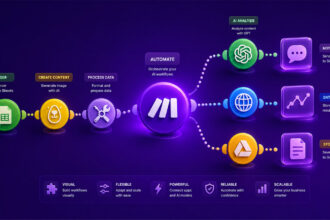
Traditional automation follows fixed rules. If this happens, do that. AI adds flexibility. It can read an email, understand that the sender is asking for a refund, summarize the issue, check the customer record, and draft a response. A human may still approve the final message, but the heavy lifting is already done.
Several technologies usually work together behind the scenes.
| Technology | Business use |
|---|---|
| NLP | Understand text |
| ML | Predict patterns |
| RPA | Move data |
| OCR | Read documents |
| Agents | Run workflows |
Natural language processing, or NLP, helps systems interpret written language. That is why AI can classify support tickets, summarize calls, rewrite email drafts, or extract action items from meeting notes. Machine learning helps tools improve pattern recognition over time, especially when they have enough data to compare outcomes.
Robotic process automation, often called RPA, handles repetitive interface actions. Think of it as software that clicks, copies, pastes, and submits forms across systems.
On its own, RPA can be rigid. Combined with AI, it becomes more adaptable because the system can understand what it is looking at rather than blindly following coordinates.
Document AI is another important layer. It extracts information from invoices, contracts, receipts, applications, and forms. This is a classic way to reduce manual work with AI because document handling tends to be slow, repetitive, and surprisingly error-prone.
The best workflows do not remove humans completely. They remove the low-value parts. AI drafts, tags, summarizes, checks, and routes. Humans review edge cases, make judgment calls, and improve the process. That balance matters, especially when customer experience or financial accuracy is involved.
Practical AI automation examples across business functions
The most useful AI automation examples are rarely futuristic. They are usually painfully ordinary, which is exactly why they work.
In customer service, AI can read incoming tickets and sort them by topic, urgency, sentiment, or customer type. A support inbox that once felt like a pile of random messages becomes a structured queue.
Refund requests can go to one workflow, technical bugs to another, and simple “how do I reset my password?” questions can receive an instant draft or automated response.
Marketing teams can automate daily business tasks around content and campaign management. For example, AI can turn a webinar transcript into a blog outline, extract social post ideas, suggest email subject lines, and summarize performance data from a campaign report.
The point is not to let AI “be the marketer.” The point is to stop wasting creative energy on formatting, first drafts, and repetitive analysis.
Sales workflows also benefit quickly. AI can enrich leads, summarize discovery calls, score prospects, draft follow-up emails, and update CRM fields. I have seen teams lose momentum simply because nobody wants to update the CRM after calls. No big mystery there. It is dull work. AI can capture the notes, identify next steps, and prepare the update while the conversation is still fresh.
Admin work is another goldmine. Scheduling, invoice reminders, document naming, file organization, meeting summaries, and task creation are not glamorous, but they keep the business moving. Browser-based admin is especially interesting because many small teams live inside tabs all day.
For that kind of work, it helps to explore tools built specifically to automate browser-based admin tasks instead of forcing every workflow through a generic platform.
A simple support workflow might look like this:
- A customer submits a support request through a form.
- AI detects the topic and urgency of the message.
- The request is routed to the right workspace or inbox.
- AI drafts a suggested reply based on previous answers.
- A human reviews and sends the final response.
HR and hiring workflows can also become lighter. AI can screen applications against predefined criteria, summarize candidate profiles, draft interview questions, and organize onboarding checklists.
There is a caveat, though. Any workflow involving people decisions needs human review and clear standards. AI can support the process, but it should not quietly become the decision-maker.
Finance teams can use AI to extract invoice details, categorize expenses, detect anomalies, and prepare payment reminders. For solo founders, that can mean fewer Sunday evenings spent reconciling messy records. For agencies, it can mean faster month-end reporting and fewer missed billable items.
Choosing the right AI tools to reduce manual work
Tool selection gets messy when every product promises to save time. A better question is: where does the work actually happen?
If your repetitive work lives across many apps, an automation platform may be the best starting point. If most of the pain is inside the browser, choose a browser automation tool. If the bottleneck is writing, summarizing, or classifying text, an AI writing or workflow assistant might be enough. Matching the tool to the workflow is boring advice, but it saves a lot of expensive tinkering.
Integration is usually the first thing to check. A tool that does not connect to your CRM, help desk, project management app, email platform, or database will create more manual work than it removes. For small teams, this matters even more because nobody has time to babysit disconnected systems.
Ease of use comes next. Some AI automation tools are powerful but require technical setup. Others are simple but limited. Neither is automatically better. A SaaS builder might be comfortable wiring APIs together. A solo consultant may prefer a no-code interface that works after one afternoon of testing. The right choice depends on the team’s actual capacity, not the most impressive feature list.
Accuracy should be tested before rollout. AI can misread context, hallucinate details, or classify edge cases incorrectly. That does not make it useless. It means the workflow needs guardrails. Start with low-risk tasks, keep human approval where needed, and review outputs regularly.
A useful evaluation checklist includes:
- The tool connects with the apps already used by the business.
- The workflow can be tested without disrupting daily operations.
- The AI output is easy to review, edit, or override.
- The pricing still makes sense when usage increases.
- The tool supports logging, history, or audit trails.
For teams already using automation platforms, AI features inside tools like Zapier can be a natural entry point. They are especially helpful when the goal is to automate daily work across existing apps without rebuilding the entire operating system of the business.
I would avoid choosing tools only because they feel exciting. Shiny software has a way of turning into another dashboard to check. The best AI tool is often the one that disappears into the workflow and quietly removes a task nobody wanted to do anyway.
Implementing and scaling your AI automation strategy
A smart automation strategy starts small, but not randomly. Pick one workflow with clear pain, clear rules, and a measurable outcome. “Save time” is too vague. “Reduce manual lead qualification from 30 minutes per day to 5 minutes” is much easier to evaluate.
Start by documenting the current workflow before adding AI. Write down the trigger, the inputs, the steps, the decision points, the tools involved, and the final output. This gives you a map. Without it, automation becomes guesswork, and guesswork has a habit of breaking at inconvenient moments.
Next, separate the workflow into three parts: what should be automated fully, what should be AI-assisted, and what should stay human. This is where many businesses go wrong. They try to automate the whole process immediately, then lose trust when the system makes one weird decision. A better approach is to let AI handle preparation and let people handle approval until the workflow proves itself.
For example, an AI system can summarize a sales call, extract objections, draft a follow-up email, and create a CRM note.
The salesperson can still review the email before sending it. Over time, if the drafts are consistently accurate, you might automate more of the process.
Scaling works best when each automation is treated like a reusable asset. Name it clearly, document what it does, assign an owner, and review it when tools or processes change. That might sound formal for a small team, but even a simple shared document can prevent confusion later.
The most sustainable systems usually follow this rhythm:
- Audit repetitive work and choose one workflow.
- Build a simple version with human review.
- Measure time saved, errors reduced, or speed gained.
- Improve the workflow based on real usage.
- Expand only after the first automation is stable.
There is also a human side to implementation. People need to understand why the automation exists. If AI is introduced as a vague productivity push, it can feel threatening or annoying. When it is framed as a way to remove repetitive busywork, adoption becomes much smoother.
For freelancers and small business owners, the same principle applies internally. Do not automate just to feel efficient. Automate the tasks that protect your best working hours.
If AI gives you back two focused hours each week, use them for strategy, client work, product improvements, or rest. That last one counts too.
AI automation works best when it feels almost boring: a cleaner inbox, fewer copy-paste loops, faster follow-ups, better organized data, and less mental clutter at the end of the day. That is the real value. Not replacing thoughtful work, but removing the repetitive layer that keeps getting in its way.
For small teams, freelancers, and builders, learning how to automate repetitive tasks with AI is less about chasing every new tool and more about noticing where time quietly leaks.
Start with one workflow, test it carefully, keep the human judgment where it matters, and improve from there.
Over time, those small automations can change the shape of the workday. The business feels lighter. Decisions happen faster. People spend more energy on strategy, clients, creativity, and growth instead of routine maintenance.
And maybe that is the most useful way to think about AI task automation: not as a shortcut around work, but as a better way to protect the work that actually deserves your attention.

Artificial Intelligence Specialist | AI-Driven Workflow Strategist