I once lost nearly an hour moving tiny bits of information between browser tabs: a lead profile, a spreadsheet, a CRM field, then back to the original page to check one detail I had missed. Nothing about the work was difficult. That was exactly the problem. It was easy enough to keep doing manually, but repetitive enough to quietly drain focus.
Bardeen is built for that awkward layer of work. The browser-based admin tasks that sit between prospecting, reporting, CRM updates, research, and follow-ups. Instead of treating every click and copy-paste as part of the job, Bardeen AI automation helps turn those repeated actions into workflows that run with far less manual effort.
For freelancers, marketers, indie makers, and SaaS teams, this can be a practical way to clean up the daily admin mess without building a complex automation stack from scratch.
Tackling tedious browser-based admin tasks
Browser admin work rarely feels difficult in the moment. One copied email here, one CRM update there, one spreadsheet row after another. The problem is that these tiny actions stack up quietly until half the morning disappears into tabs, forms, dashboards, and “just one more” manual update.
For freelancers, marketers, SaaS builders, and indie makers, this kind of work is especially painful because it sits between higher-value tasks. You might be researching leads on LinkedIn, checking sign-up data in a dashboard, moving contacts into a CRM, or pulling weekly numbers into a report. None of it is strategic on its own, but skipping it creates messy data and missed follow-ups.
That is why browser automation AI is such a practical category. A lot of admin work already follows a repeatable pattern. Open a page. Extract something. Paste it somewhere else. Click a button. Repeat. Once you can describe that pattern, you can usually automate it.
For a broader view of where this fits, it helps to look at how teams automate repetitive business tasks with AI before choosing specific tools for browser-level workflows.
Introducing Bardeen: your AI-powered browser automation solution
Bardeen is a browser extension built to automate actions inside the web apps you already use. Instead of forcing you to build a complex backend workflow, it works closer to where admin work actually happens: inside your browser.
That difference matters. Many automation tools are great when apps expose clean APIs, but browser tasks are often messier. You need to scrape text from a webpage, click through a dashboard, copy information from LinkedIn, or move data from a page that was never designed for automation. Bardeen AI automation is useful because it can interact with web pages directly and connect those actions with tools like spreadsheets, CRMs, email apps, and productivity platforms.
You do not need to code to get started. Bardeen offers pre-built automation templates, often called playbooks, and lets you create workflows from actions you perform in the browser. For someone who spends most of the day in tabs, that feels more natural than opening a separate automation builder and trying to translate every step from scratch.
You can explore the tool through Bardeen’s browser automation platform if your admin work mostly happens across web apps rather than inside one single system.
How Bardeen AI automation transforms admin workflows
The real value of Bardeen is not that it saves a click or two. It saves context switching. That is the part I tend to notice first. When a workflow jumps from LinkedIn to Google Sheets to HubSpot to Gmail, the actual task might be simple, but your attention keeps resetting.
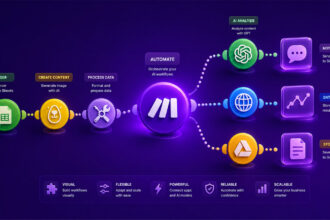
Bardeen workflow automation helps by turning those repeated browser movements into reusable actions. It can extract data from websites, fill forms, update records, send information to another app, and trigger actions based on what is happening on a page.
A simple way to think about it:
| Manual step | Bardeen action |
|---|---|
| Copy lead data | Extract fields |
| Paste into CRM | Update record |
| Check dashboards | Pull metrics |
| Send follow-up | Trigger email |
This is where AI web automation becomes more than a productivity buzzword. If the tool can understand page elements, capture structured data, and repeat the workflow reliably, you stop treating the browser like a manual workspace and start treating it like an automation surface.
For small businesses building bigger systems, this also connects nicely with AI workflow automation for small businesses, where browser tasks are often the first layer worth cleaning up.
Practical examples: automating common admin tasks with Bardeen
Lead generation is one of the clearest use cases. Suppose you are searching LinkedIn for potential SaaS customers, agency partners, or podcast guests. Manually, you might open profiles, copy names, roles, company names, and profile URLs, then paste everything into a spreadsheet. With Bardeen, you can create a workflow that extracts selected profile details and sends them directly into Google Sheets or a CRM.
Another useful workflow is CRM enrichment. Let’s say you already have a list of companies, but the records are missing LinkedIn URLs, job titles, or website details. Bardeen can help collect that information from browser pages and push it into the right fields. No glamorous magic here, just fewer copy-paste marathons. Honestly, that is often enough.
Report generation is another area where browser automation AI can remove a surprising amount of friction. Many marketers still open dashboards every week, grab performance numbers, and move them into a reporting spreadsheet. Bardeen can help pull data from web dashboards, update a sheet, and prepare the raw material for a recurring report.
Common admin workflows worth automating include:
- Saving LinkedIn profile details into a lead database.
- Adding website data to CRM contact records.
- Copying dashboard metrics into weekly reporting sheets.
- Creating follow-up tasks from browser research sessions.
The pattern is usually the same: identify repetitive browser steps, capture the data, and send it somewhere useful.
Getting started: building your first Bardeen workflow
A good first workflow should be boring. That may sound odd, but boring tasks are easier to automate and easier to trust. Pick something you do several times a week, not a huge multi-app process with edge cases everywhere.</p
Start with one browser action that has a clear input and output. For example, extract a name, company, and profile URL from a page, then send that data to a spreadsheet. Once that works, you can add more steps, like assigning a lead status or creating a CRM task.
A simple starting process looks like this:
- Install the Bardeen browser extension.
- Choose a pre-built playbook or start from a repeated action.
- Connect the apps you use, such as Sheets, Notion, or a CRM.
- Test the workflow on a small sample before using it at scale.
- Refine the automation when a page layout or field changes.
Pre-built playbooks are usually the fastest path because they show how Bardeen expects workflows to be structured. After testing a few, it becomes easier to design your own. I would avoid automating ten-step processes on day one. A small automation that works every time beats an ambitious one you do not fully trust.
Unlock greater efficiency with Bardeen web automation
Bardeen works best when you aim it at the admin tasks that are too specific for generic automation but too repetitive to keep doing manually. That middle zone is everywhere: prospecting, research, CRM hygiene, reporting, content operations, recruiting, and customer follow-up.
The biggest win is time, of course, but reduced errors might matter even more. Manual browser admin creates small mistakes: pasted data in the wrong cell, skipped fields, outdated lead notes, duplicated records. Bardeen workflow automation helps standardize those steps so the same action happens the same way each time.
There is also a mental benefit. When small admin loops stop interrupting your day, deep work becomes easier to protect. You can research leads without dreading the cleanup. You can check dashboards without building reports from scratch. You can keep your CRM useful without treating it like a second job.
For teams and solo operators who live in browser-based tools, Bardeen AI automation is less about replacing work and more about removing the repetitive layer around it. That is usually where the quickest productivity gains are hiding.
Browser admin work probably will not disappear completely, and that is fine. Some tasks still need judgment, context, and a human eye. The real opportunity is removing the repetitive layer around those decisions.
Bardeen fits well when your day is full of small browser actions that repeat across leads, reports, CRMs, spreadsheets, and web dashboards. Start with one annoying workflow, automate it carefully, then build from there. The best automation systems rarely begin with a huge redesign. They usually start with one task you are simply tired of doing by hand.

Artificial Intelligence Specialist | AI-Driven Workflow Strategist