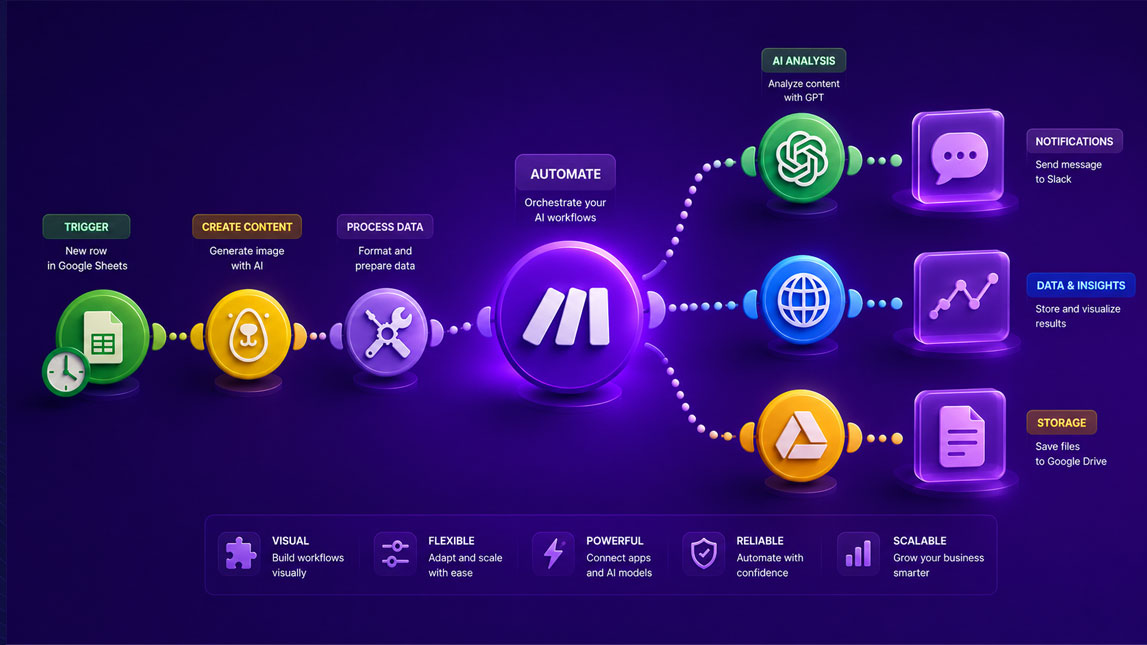
The first time you build an AI automation, the hard part usually is not the prompt. It is connecting the right tools, passing clean data between them, and making sure the workflow does not fall apart when one step changes.
That is where Make.com feels practical. Instead of hiding the process behind code, it gives you a visual canvas where you can map each AI action, app connection, filter, and output clearly. For freelancers, marketers, indie makers, and SaaS teams, that makes Make AI automation easier to test, adjust, and actually use in day-to-day work.
Unlocking flexible AI workflows with Make.com’s visual builder
Make.com is useful when an AI workflow has more moving parts than a simple “send prompt, get answer” setup. I like it because the whole automation appears as a visual scenario, with each app, AI step, filter, and action placed in front of you.
That matters when you are building Make AI automation for real work, not quick demos. A freelancer might summarize client notes, update a CRM, and draft a follow-up email in one flow. A SaaS builder might classify support tickets before routing them. Make.com gives you room to connect those pieces without turning the workflow into a black box.
For a broader foundation, this fits naturally with building no-code AI workflows without a developer, especially when you want more flexibility than a single-purpose automation tool can offer.
The power of visual workflow automation for AI on Make.com
The biggest advantage of Make.com is not only that it is no-code. Plenty of platforms say that. The stronger point is that its visual workflow automation makes complex logic easier to understand before it breaks something important.
You drag modules onto a canvas, connect them, then decide what happens at each step. One module might pull new form submissions, another might send the text to an AI model, and a filter might check whether the response contains a buying signal. The final step could create a task, send a Slack message, or update Airtable.
That visual layout helps when you are debugging.
Instead of guessing where the issue sits, you can inspect each module, look at the input and output, and adjust the flow. For AI workflows, this is especially useful because responses can vary. You need a system that lets you handle that variation without rebuilding everything from scratch.
Make.com also makes no-code AI automation easier for non-technical operators. Marketers can test campaign workflows. Indie makers can prototype backend automations. Consultants can build repeatable client systems without asking a developer to change every small detail.
Key features for building adaptable Make AI automation
Flexible AI workflows need more than one AI module. They need branching, cleanup, fallbacks, and clear data movement. This is where the Make automation platform becomes practical rather than just visually nice.
Here are the features I would pay attention to first:
- AI app modules help connect services such as OpenAI and other AI tools into wider workflows.
- Routers let one workflow split into different paths depending on the data.
- Filters control when a step should run, which keeps automations cleaner and safer.
- Data transformation tools reshape messy input before sending it to an AI model.
- Error handling helps prevent one failed AI response from stopping the whole scenario.
I would not treat these as “advanced” features. They are the difference between a fragile automation and a workflow you can actually trust during a busy week.
For small businesses building repeatable systems, this connects directly to using AI workflow automation across daily operations.
Practical use cases: seeing Make.com AI workflows in action
Content brief generation
A marketer could use Make.com AI workflows to turn a client intake form into a first-draft content brief. The scenario might start when a new Typeform response arrives, send the answers to an AI module, generate a structured brief, then save it in Google Docs or Notion.
The value is not that AI writes everything. It is that the repetitive setup work disappears. You still review the angle, refine the examples, and check the strategy, but you are not staring at a blank document every time.
Lead enrichment and scoring
For freelancers and SaaS teams, Make.com can help qualify leads before they reach your inbox. A workflow could pull a new lead from a form, search available company data, ask AI to summarize the business context, then score the lead based on fit.
A simple version could look like this:
- Capture a new lead from a form or CRM.
- Send the lead details to an AI module for classification.
- Route high-fit leads to Slack or a sales pipeline.
- Store lower-priority leads for later nurturing.
That is where visual automation starts to feel useful. You can see why one lead goes down one route and another gets parked.
Support ticket triage
Customer support is another strong use case. Make.com can receive a new ticket, ask AI to detect urgency and topic, then send billing issues, bug reports, or cancellation risks to different places.
This is not about replacing support teams. It is about reducing the sorting work that slows them down. When a ticket arrives already tagged, summarized, and routed, the human response can be faster and more focused.
For teams ready to test this directly, Make.com is worth exploring because the visual scenario builder makes these AI flows easier to prototype without committing to a heavy engineering project.
Getting started: building your first AI workflow on Make.com
Start small. A good first Make AI automation should have one clear trigger, one AI step, and one useful output. For example, take a new Google Form response, summarize it with AI, then send the summary to your email or workspace.
Once that works, add logic.
You might filter requests by urgency, route different topics to different tools, or add a review step before anything gets published or sent to a client. This gradual approach keeps the workflow understandable. It also makes debugging less painful, which your future self will appreciate.
A useful first build could follow this flow:
- Choose the app that starts the workflow.
- Add an AI module to process the input.
- Send the result to a tool you already use.
- Test with real examples before scaling.
Make.com works best when you treat it as a flexible operations layer. Not magic, not a shortcut for thinking, but a visual way to connect AI with the tools already running your business.
Make.com stands out because it makes AI automation visible, editable, and easier to trust. You can start with a simple flow, see how each step behaves, then add logic, routing, and safeguards as your process becomes more mature.
For small teams and solo operators, that flexibility is often the real win. The goal is not to automate everything at once, but to build workflows that remove repeated manual work while still leaving room for human judgment where it matters.
FAQ
What is Make.com and how does it help with AI automation?
Make.com is a visual automation platform that allows users to connect apps and automate workflows. For AI, it enables building sophisticated AI-powered processes by integrating various AI services and tools without writing code.
Can I build complex AI workflows without coding on Make.com?
Yes, absolutely. Make.com is designed for no-code AI automation, providing a drag-and-drop interface to visually construct intricate workflows, even those involving multiple AI steps and conditional logic.
What are the benefits of visual workflow automation with Make.com?
Visual workflow automation on Make.com offers clarity, ease of understanding, and rapid development. It allows users to see the entire process flow, identify bottlenecks, and make adjustments quickly, enhancing collaboration and efficiency.
How does Make.com integrate with AI tools?
Make.com provides numerous pre-built connectors for popular AI services like OpenAI, Google AI, and many others. These modules allow you to easily incorporate AI capabilities such as natural language processing, image recognition, and data analysis into your automated workflows.
Is Make.com suitable for small businesses looking for AI automation?
Definitely. Make.com’s no-code approach and visual interface make advanced AI automation accessible and affordable for small businesses. It helps them streamline operations, improve decision-making, and scale without needing dedicated developers.

Artificial Intelligence Specialist | AI-Driven Workflow Strategist