
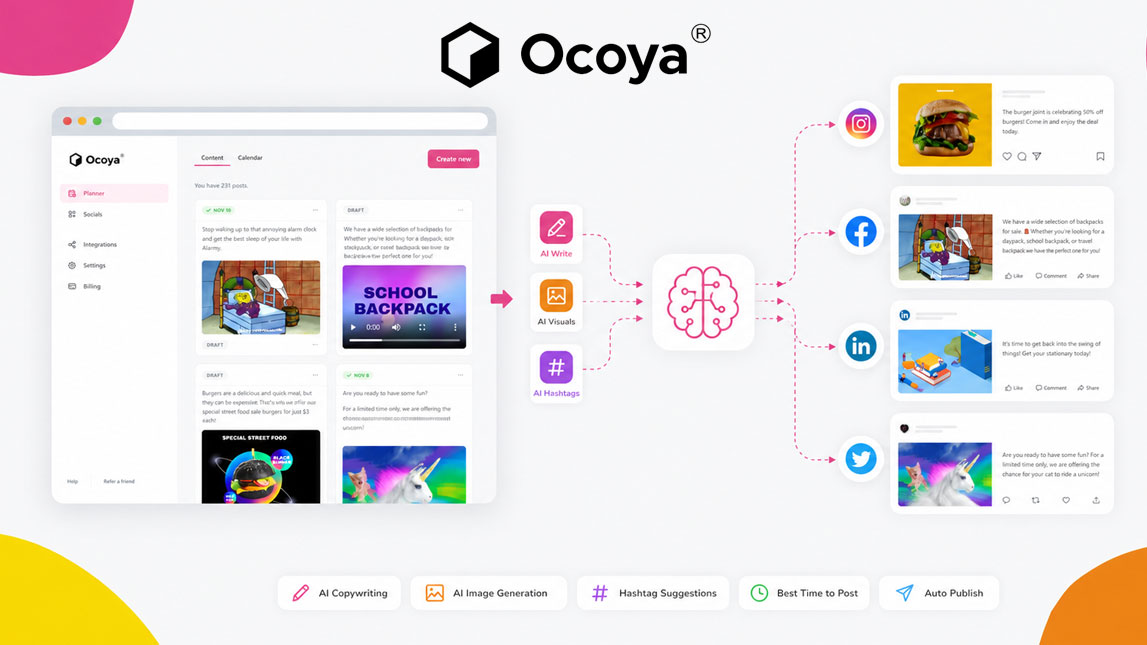
You open your content calendar and there it is again: three platforms to feed, a product update to promote, and no clean caption ready to publish. That is where a tool like Ocoya starts to make sense.
Instead of treating social media as a daily scramble, Ocoya helps turn content creation and scheduling into a repeatable workflow. For freelancers, marketers, and SaaS builders, that means fewer blank-page moments and more time spent shaping the message.
Unlocking efficiency: what is Ocoya AI social media automation?
Ocoya is built for one messy part of content work: turning ideas into publishable social posts without jumping between five tools. You can generate post copy, create creative assets, organize campaigns, and schedule publishing from one dashboard.
That makes it a practical content automation tool for small teams trying to stay consistent without making social media their full-time job. For a broader system, it fits naturally inside AI workflows for scaling social content production.
Crafting compelling posts with Ocoya’s AI content generator
The main appeal of Ocoya’s AI post generator is speed, but the better use case is structured ideation. You give it a topic, product angle, campaign goal, or short brief, and it helps create captions, hashtags, and platform-ready variations.
I would not treat it as a “one click and publish” machine. The smarter workflow is to use Ocoya as a first-draft engine, then tighten the voice yourself. That small edit is what makes the post sound like your brand instead of a generic AI caption.
What you can generate
Ocoya can help with recurring social content tasks:
- Short promotional captions for product launches or offers.
- Educational posts that explain a feature, tip, or workflow.
- Hashtag suggestions to organize and position content.
- Creative directions for simple visuals or campaign ideas.
A sharper brief usually creates better output.
Streamlining your workflow: Ocoya’s AI social media scheduler
Once the content is drafted, Ocoya’s scheduler helps keep it from sitting in a forgotten document. The social media scheduler AI lets you plan posts, organize campaigns, and publish across platforms without manually logging in every day.
This is especially useful when you batch content. Writing several posts in one focused session, polishing them, then spacing them across the week removes a lot of daily friction.
| Task | Ocoya role |
|---|---|
| Caption writing | AI draft generation |
| Visual planning | Creative support |
| Publishing | Scheduled automation |
| Campaign flow | Content organization |
Used well, it does not replace strategy. It protects the strategy from repetitive admin.
Practical application: a step-by-step Ocoya workflow
A simple Ocoya workflow starts before you open the tool. First, decide what the post needs to do: drive clicks, explain a feature, warm up an audience, or repurpose a blog idea.
Build the post
Start with a focused brief inside Ocoya. Add the product, audience, platform, tone, and goal. Then generate a few caption options rather than accepting the first one.
After that, edit for specificity. Replace broad phrases with real details, sharpen the hook, and remove anything that sounds too polished in the wrong way.
Schedule and refine
Once the caption feels solid, pair it with a visual or creative asset, choose the platform, and place it into the calendar. This is where Ocoya’s AI social media platform becomes useful for repeatable campaigns rather than isolated posts.
A practical flow could look like this:
- Choose one campaign theme for the week.
- Generate three to five post variations.
- Edit each caption for brand voice and clarity.
- Add visuals or creative directions.
- Schedule posts across the right platforms.
Nothing fancy. That is the point.
The impact of Ocoya: benefits for social media management
As an informal Ocoya review, I would describe the tool as most useful for people who already know they need to post consistently but do not want to build a complicated content machine from scratch. It reduces switching costs, speeds up drafts, and makes scheduling feel less scattered.
The biggest benefit is not just saving time. It is making social content easier to repeat. When your ocoya ai social media workflow handles drafts, scheduling, and campaign organization in one place, you have more room for positioning, offers, and creative judgment.
Ocoya is not a magic button for social media, and honestly, that is a good thing. Its real value is in removing the repetitive parts: drafting captions, organizing ideas, and scheduling posts before they become another last-minute task.
For small teams and solo operators, that kind of ai social media automation can make social media feel less reactive and more intentional. The tool gives you structure, but the strategy still comes from you.

Artificial Intelligence Specialist | AI-Driven Workflow Strategist