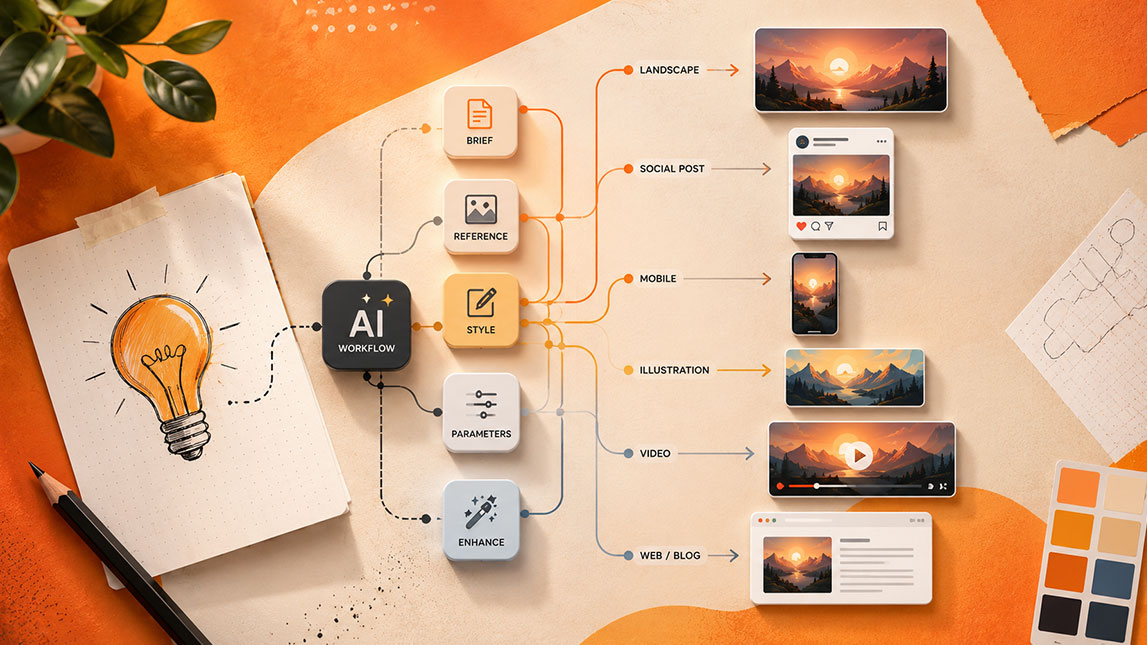
Last week, I took one simple content idea and tried to turn it into visuals for different channels. The idea was solid, but the manual work was not: one size for LinkedIn, another for Instagram, a cleaner version for email, then a short visual hook for video. That is exactly where AI content repurposing tools start to feel less like a nice extra and more like a practical production shortcut.
Instead of rebuilding every asset from scratch, AI can help you repurpose content with AI into visual formats that fit each platform. The real value is not just speed. It is being able to create multiple visuals with AI while keeping the message clear, the design consistent, and the workflow light enough to repeat every week.
The power of AI in transforming one idea into endless visuals
A single idea rarely has one visual life anymore. A launch announcement can become a LinkedIn carousel, a square Instagram post, a newsletter banner, a short video hook, a comparison graphic, and a quote card without starting from scratch each time.
That is where AI content repurposing tools become genuinely useful. Not because they “replace creativity”, which always sounds a bit dramatic, but because they remove the repetitive production work that slows everything down: resizing, reformatting, rewriting, layout testing, background generation, caption extraction, and visual variation.
For freelancers, indie makers, marketers, and SaaS builders, this matters. Most of us do not have a full design team waiting for a new campaign brief. We have one idea, several channels to feed, and limited time before the next task appears.
The useful workflow is simple: start with one clear message, then let AI help turn it into visual variations for different platforms, formats, and audience moments. For a wider view of how this fits into production systems, the broader guide on faster AI design workflows connects this workflow to the full content creation process.
What are AI content repurposing tools and why do you need them for visuals?
AI content repurposing tools help you take existing material and reshape it into new content formats. In visual work, that usually means turning text, videos, screenshots, blog ideas, product updates, or campaign notes into graphics, short clips, banners, thumbnails, infographics, and social media assets.
The important part is transformation, not just generation.
A strong AI visual content workflow does not begin with a blank canvas every time. It begins with a source: a product feature explanation, a podcast clip, a founder insight, a customer quote, or a blog section. The tool then helps extract the message, suggest formats, create layouts, adjust dimensions, generate imagery, and sometimes write the copy that sits inside the design.
This solves a real problem: visual consistency at scale. Without AI, repurposing one idea across channels can feel oddly manual. You create the first design, duplicate it, resize it, rewrite the headline, adjust spacing, fix cropped elements, change the background, export, and repeat.
AI design repurposing helps with three things at once:
- It reduces repetitive design work so creators can focus on the message.
- It keeps visual assets closer to brand guidelines across multiple channels.
- It expands reach by adapting one idea for different platform behaviors.
Different platforms reward different visual formats. A static graphic might work well on LinkedIn, while the same idea may need motion on TikTok, a thumbnail on YouTube, and a concise banner inside an email. Repurposing lets the idea travel instead of staying locked inside one format.
Here is a simple way to think about the source-to-output relationship:
| Source idea | Visual outputs | Best use |
|---|---|---|
| Blog insight | Carousel, infographic | Education content |
| Product update | Banner, demo clip | Launch promotion |
| Customer quote | Quote card, story | Social proof |
| Video snippet | Reel, thumbnail | Short-form reach |
Step-by-step AI workflows for generating multiple visuals from a single idea
The best way to repurpose content with AI is to treat the process like a small production line. Not a rigid, corporate workflow, but a repeatable path that keeps you from improvising every asset.
Start with one clear content seed
Before opening any tool, define the idea in one sentence. AI tools tend to amplify whatever you give them. A vague idea creates vague visuals. A sharp idea gives the system something useful to work with.
Instead of starting with “AI productivity tips”, use something tighter: “Freelancers can save two hours per week by turning client notes into reusable content templates.” That sentence already suggests a carousel, a simple infographic, a before-and-after graphic, and maybe a short video script.
A useful prompt at this stage could be:
The goal is not to accept every suggestion. Look for versions that feel platform-native: a LinkedIn carousel can explain a process, an Instagram post might need one punchy takeaway, and a YouTube thumbnail needs contrast and curiosity.
Generate format-specific visual directions
Once the core idea is clear, ask AI to turn it into design directions for each asset. This is where ai content repurposing tools become more than a brainstorming assistant.
You can ask for layout ideas, headline options, image concepts, icon suggestions, or visual hierarchy. For design tools with built-in AI, this may happen directly inside templates. For text-based AI tools, you can generate a creative brief first and paste it into your design platform.
A practical workflow might look like this:
- Extract the core message from the original idea.
- Create 3 to 5 audience-specific angles.
- Turn each angle into a visual format.
- Generate copy variations for each format.
- Resize and adapt the strongest design across channels.
This is especially helpful when using tools that combine writing, design, and publishing. For example, a platform like Simplified can support the “one idea into many assets” approach, which is why a deeper breakdown of turning one idea into several content formats is useful if you want a more tool-specific workflow.
Adapt the same idea into static and motion assets
Static visuals are often the easiest starting point. Create a carousel, quote card, infographic, or banner first, then use that same structure to build motion.
A carousel can become a short narrated video. An infographic can become a vertical explainer. A quote card can become a 7-second animated post. A product banner can become a quick before-and-after clip.
For video-first repurposing, the workflow changes slightly. You might begin with a webinar, demo, podcast, or screen recording, then pull out the strongest visual moments. AI can help detect highlights, generate captions, suggest cuts, create thumbnails, and reframe the video for vertical platforms. That is where tools focused on video repurposing become valuable, especially for creators exploring turning videos into visual content.
The trick is to avoid making every version look like a lazy copy. Each visual should feel like it belongs where it is published.
Key AI design repurposing techniques and tools in action
AI design repurposing works through a handful of techniques that show up across many tools. Some are simple, like resizing. Others are more creative, like style transfer or prompt-based background generation.
Automated resizing is usually the first win. You create a design once, then adapt it into square, vertical, horizontal, and story formats. AI helps reposition text, crop images, and preserve important elements. It still needs review, because automated cropping can cut off exactly the wrong thing, but it gets you much closer than manual resizing.
Template generation is another strong use case. Instead of designing a carousel layout manually, AI can suggest a structure based on the content type: problem, insight, steps, example, takeaway. That matters when you are creating educational content at volume.
Text-to-image and text-to-video tools add creative range. You can generate background visuals, abstract illustrations, scene concepts, product-style images, or short motion clips from a prompt. For SaaS content, I would keep this controlled. Overly dramatic AI images can make a practical brand feel weirdly cinematic.
Style transfer helps when you want visual variety without losing brand recognition. You can keep the same message and apply different visual treatments, such as minimal, editorial, bold, playful, or product-led.
Here is a quick comparison of common techniques:
| Technique | What it does | Useful for |
|---|---|---|
| Auto-resizing | Adapts dimensions | Multi-platform posts |
| Template AI | Suggests layouts | Carousels, banners |
| Text-to-image | Creates visuals | Backgrounds, concepts |
| Caption extraction | Pulls key text | Video snippets |
| Style transfer | Changes look | Creative variations |
Most tools fall into three groups: AI graphic design platforms, AI video editing tools, and generative image or video tools. The strongest workflows often combine them rather than relying on one platform for everything.
Maximizing efficiency: best practices for AI visual content workflow
The fastest workflow is not always the best one. I have seen AI-generated content look “done” in minutes but still feel generic because the source material was thin or the brand direction was unclear.
Start by preparing strong source content. Give the AI a clear message, audience, tone, platform, and desired format. When possible, include brand colors, preferred layout style, words to avoid, and examples of past visuals that performed well.
Prompting matters, but not in a mystical way. You are basically briefing a fast junior assistant. Be specific about the job.
Brand consistency needs its own checkpoint. AI can produce attractive visuals that slowly drift away from your identity. One week everything is minimalist. The next week your feed looks like a cyberpunk conference poster. Fun, maybe. Useful, not always.
A simple review loop helps:
- Check whether the main message is still clear.
- Confirm that colors, fonts, and visual tone match your brand.
- Remove anything that looks generic or overproduced.
- Adjust each format for the platform instead of exporting blindly.
- Save the strongest layouts as reusable templates.
Use AI for the first 70%, then apply human judgment to the final 30%. That last part is where taste, positioning, and audience knowledge still matter.
Scaling your content strategy with AI-powered visual repurposing
AI-powered repurposing changes the economics of content production. Instead of treating every visual as a separate task, you can build a repeatable system where one strong idea feeds several channels.
That does not mean publishing everywhere for the sake of it. Content scaling tools are most useful when they help you match the same idea to different audience behaviors. A founder insight might become a thoughtful LinkedIn post, a simple Instagram graphic, a short video hook, and an email header. Each version carries the same message, but the format changes how people experience it.
For small teams, this is the real advantage. You can maintain a consistent online presence without burning half the week inside design files. The output grows, but the creative direction stays focused.
The strongest results usually come from a balanced approach: use AI to multiply the idea, then use human editing to make each version feel intentional. That is the difference between scaling content and simply producing more noise.
AI visual repurposing works best when it supports the idea instead of burying it under endless variations. One clear message, shaped carefully for each platform, can do more than ten rushed designs that all feel slightly off.
For freelancers, marketers, indie makers, and SaaS teams, the real win is momentum. When AI content repurposing tools handle the repetitive parts, you get more space to think about positioning, taste, and what your audience actually needs. And honestly, that is where the better visuals usually come from.

Artificial Intelligence Specialist | AI-Driven Workflow Strategist