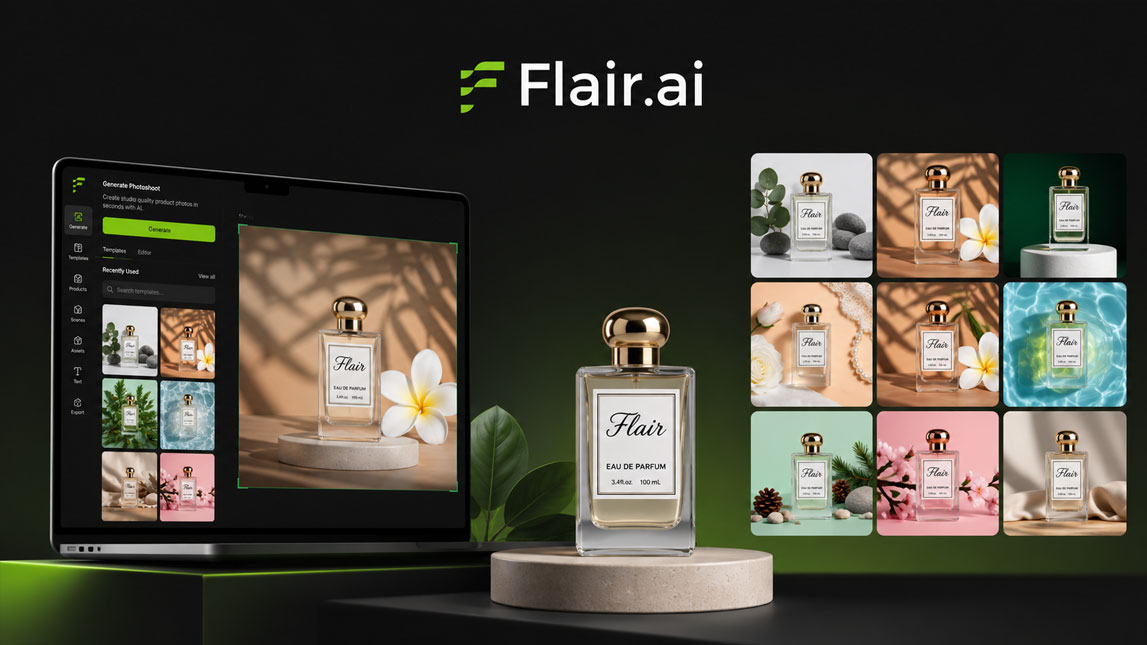
I started testing Flair AI the way most ecommerce people probably would: with one plain product image and the hope that it could become something more useful than another flat mockup.
That is where Flair AI product photography gets interesting. Instead of planning a shoot, finding props, adjusting lighting, and waiting for edits, you can turn a simple product cutout into ad-ready scenes for store pages, social campaigns, and quick visual tests.
Elevate your product visuals with Flair AI product photography
Flair AI product photography is useful when you need polished product shots, but do not have the time or budget for a full studio setup. I see it fitting especially well for small ecommerce teams, solo founders, and marketers who need more visual angles than one photoshoot can realistically cover.
The core idea is simple: upload your product, place it into an AI-generated scene, then shape the final image around your brand or campaign. As an ecommerce photo tool, Flair sits between a quick mockup and a usable marketing asset.
For a broader view of where this type of tool fits, it pairs naturally with AI tools for ecommerce mockups and product visuals.
The simple workflow: generating AI product images with Flair
The workflow starts with a clean product image, usually a bottle, box, cosmetic item, accessory, or packaged product on a plain background. Flair helps isolate the item, then lets you rebuild the image around it.
From there, you choose a template or describe the scene you want. The ai product image generator can create a marble bathroom counter, a warm kitchen setup, a luxury shelf, or a bold ad-style background with stronger lighting.
A simple workflow looks like this:
- Upload a clear image of the product.
- Remove or isolate the original background.
- Select a template or write a scene prompt.
- Adjust composition, lighting, and visual style.
- Export the final image for ads or store pages.
It feels less like editing from scratch and more like directing a small virtual shoot.
Key features of Flair AI for stunning ecommerce photos
Scene control without a design-heavy process
The strongest part of Flair AI is how it helps non-designers create product scenes that still feel intentional. Background removal, object placement, template layouts, and prompt-guided generation reduce the blank-page problem.
Instead of staring at layers, you start with a visual direction.
Here is how the main features translate into practical use:
| Feature | Practical benefit |
|---|---|
| Background removal | Cleans product cutouts fast |
| AI scene generation | Creates lifestyle-style settings |
| Templates | Speeds up ad concepts |
| Prompt control | Guides mood and context |
For me, the templates are the quiet productivity win. Prompts are powerful, but they can also become a rabbit hole. Templates give you a starting point, then prompts help push the image closer to your brand.
A skincare brand could test clean spa visuals, glossy editorial shots, and minimal close-ups in one session. A marketer could build product ad visuals for several audience segments before choosing which concept deserves budget.
Transforming product ads and store listings with Flair AI
Flair AI becomes most useful when you place it inside a real content workflow. One product can become a set of campaign visuals: a hero image for the store, square creatives for Meta ads, vertical assets for stories, and clean lifestyle shots for email.
That range matters because ecommerce visuals rarely have one job. A product page needs clarity. An ad needs attention. A landing page needs trust.
Flair makes those variations faster, especially when the product itself does not change.
I would not expect every output to be perfect on the first try. Shadows, reflections, and scale can still need review. No biggie, as long as you check the image before publishing
You can explore the tool directly through Flair AI for product visuals when you want to test how your own product behaves inside generated scenes.
Is Flair AI the right AI product scene generator for you?
Flair AI makes the most sense if your bottleneck is visual variety. Maybe your ads look repetitive, your store images feel flat, or you need campaign visuals before justifying a proper shoot.
It is not a full replacement for high-end photography in every case, especially where tiny details matter. Still, as an ai product scene generator, it can be a practical layer in the content stack.
A focused Flair AI review would come down to this: it helps you move faster from product image to usable marketing concept, without needing a full creative team behind every visual..
Flair AI works best when you treat it as a visual testing engine, not a magic replacement for every photoshoot.
It gives ecommerce teams, freelancers and marketers a faster way to explore product scenes, build ad variations, and make store visuals feel less static
For brands that need fresh creative often, that speed can make a real difference. The useful question is not whether AI can create a perfect product photo every time, but whether it helps you find better visual directions before time and budget run out.
FAQ
How does Flair AI simplify product photography for e-commerce?
Flair AI acts as an AI product image generator allowing users to upload a product photo and then describe the desired scene or background. It automates the creation of high-quality on-brand product shots for ads and online stores without the need for complex photo shoots.
What types of product visuals can I create with Flair AI?
With Flair AI, you can generate a wide range of product ad visuals, from lifestyle shots and studio setups to abstract or conceptual scenes. It’s an excellent AI product scene generator for creating diverse marketing content.
Is Flair AI a good alternative to traditional product photography?
For many e-commerce businesses, Flair AI offers a cost-effective and time-saving alternative. While it may not replace every professional shoot, it excels at generating a high volume of diverse product shots quickly, making it a powerful ecommerce photo tool.
Can I customize the scenes generated by Flair AI?
Yes, Flair AI provides extensive customization options. You can guide the AI with text prompts, adjust lighting, angles, and even integrate your brand’s aesthetic to ensure the generated images align perfectly with your vision.
What are the main benefits of using Flair AI for product shots?
The primary benefits include significant cost and time savings, the ability to generate a vast array of unique product ad visuals, enhanced creative control over your product’s presentation, and consistent brand imagery across all platforms.

Artificial Intelligence Specialist | AI-Driven Workflow Strategist