I’ve lost count of how many times a decent product looked average simply because the visual did not do it justice. In ecommerce, that gap matters. A flat product photo can make a brand feel unfinished, while the right mockup can instantly show context, quality, and intent.
That is why an ai product mockup generator is becoming such a useful tool for small teams.
Instead of waiting on full photoshoots for every campaign idea, brands can create cleaner product images, lifestyle scenes, and ad-ready visuals faster, then decide what is actually worth scaling.
The rise of AI in ecommerce visuals: beyond traditional photography
Product visuals used to be one of those ecommerce tasks that quietly ate the budget. You needed a photographer, a studio, lighting, props, editing time, and usually a few rounds of “can we make this look more premium?” before anything went live.
That setup still makes sense for some brands, especially when texture, fit, or luxury positioning matters. But for many ecommerce teams, the bottleneck is not artistic ambition. It is speed.
A founder launching ten SKUs, a marketer testing paid ads, or a designer preparing seasonal banners cannot wait two weeks for every visual variation. This is where AI ecommerce image generator tools started to feel less like a novelty and more like practical ecommerce design tools.
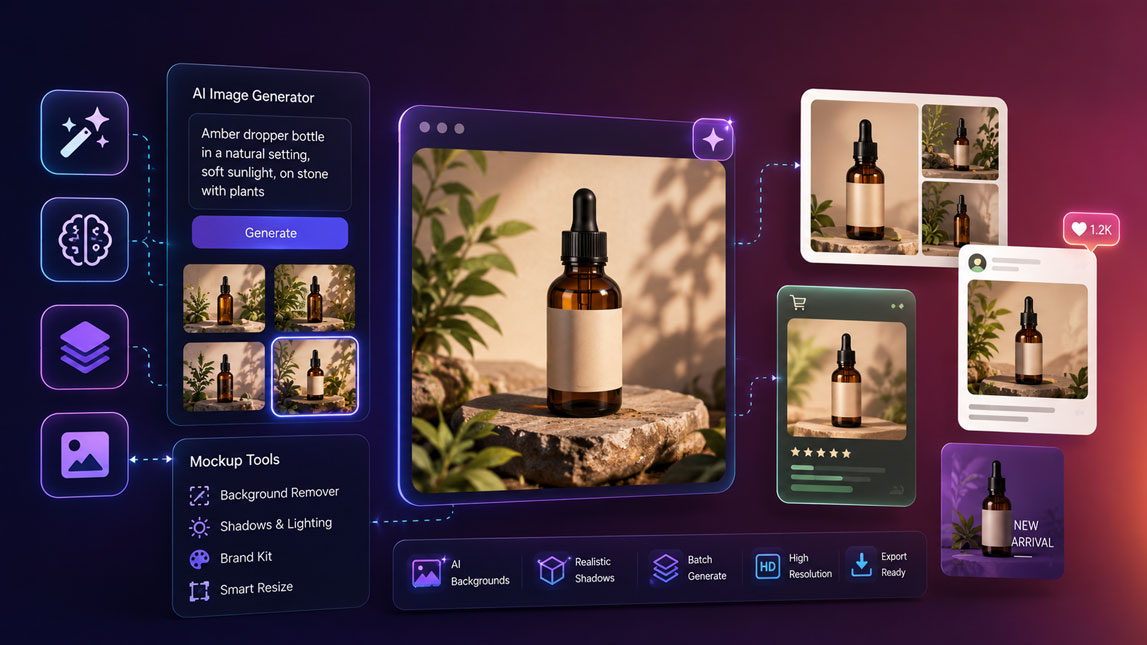
An AI product mockup generator can turn a clean product image into multiple store-ready scenes: minimalist backgrounds, lifestyle settings, ad creatives, social images, and product detail visuals.
The bigger shift is not just cheaper images. It is the ability to test visual ideas before committing budget.
For a broader view of where these tools fit in the design stack, it is worth comparing them with other AI image generation tools for design and marketing.
What is an AI product mockup generator and why do you need one?
An ai product mockup generator is a tool that uses AI to place a product, logo, package, or design into a realistic visual setting. Instead of manually building a mockup in Photoshop or arranging a physical shoot, you upload the asset, choose or describe a scene, and let the system create a polished product visual.
The best way to think about it: product mockup AI sits between traditional template mockups and full AI image generation. It is not just slapping your product onto a flat background. A good tool understands lighting, perspective, shadows, edges, and surface interaction well enough to make the product feel like it belongs in the scene.
That matters because ecommerce visuals carry more weight than many teams admit. A weak product image can make a solid product feel cheap. A strong one can help customers understand size, mood, use case, and value in seconds.
The practical benefits are easy to feel once you use these tools in a real workflow:
- Launch pages faster without waiting for a full photo production cycle.
- Create ad variations for different audiences, seasons, and angles.
- Reduce photography costs for early-stage product testing.
- Keep visual branding more consistent across store, ads, and social content.
- Experiment with scenes before deciding which ones deserve a real shoot.
I would not treat AI mockups as a universal replacement for photography.
That is a bit too neat. Instead, they are excellent for iteration, campaign testing, concept validation, and scaling visual production when your team has more ideas than hours.
Essential features of AI ecommerce image generators
Not every product image generator is built for ecommerce. Some tools create beautiful images but struggle with product consistency. Others are great for clean catalog shots but weak at lifestyle scenes. The difference becomes obvious when you try to use the output in a real store or ad account.
Core editing features
At minimum, an AI ecommerce image generator should help you clean up and prepare product visuals without making the product look distorted. Background removal is the obvious one, but it is only the start. You also want control over shadows, reflections, crop ratio, resolution, and placement.
Lighting adjustments are especially important:
A product placed into a bright kitchen scene with studio lighting from the opposite direction will feel fake, even if the background itself looks good. The same applies to shadows. No shadow, and the product floats. Too much shadow, and it looks pasted in.
Here is a simple way to compare the features that matter most:
| Feature | Why it matters | Best use |
|---|---|---|
| Background removal | Creates clean inputs | Catalog images |
| Scene generation | Adds context fast | Lifestyle shots |
| Lighting control | Improves realism | Ad creatives |
| Shadow creation | Grounds the product | Mockups |
| Batch processing | Saves production time | Large stores |
Advanced controls
Once the basics are covered, the stronger tools start offering more granular control. Material rendering is useful for packaging, cosmetics, bottles, apparel, and reflective products. A matte skincare tube should not react to light like glass. A metal bottle should not look like plastic. Small details, big credibility difference.
Batch processing is another underrated feature. It sounds boring until you need to create consistent visuals for 40 products in the same campaign style.
Manually prompting each image gets old fast. A tool that can apply the same background logic, size, framing, and lighting style across a product set can save hours.
For ecommerce teams, consistency often beats pure creativity.
Revolutionizing product presentation with AI product photography
AI product photography changes the way brands think about visual variety. Instead of asking, “What photos can we afford to shoot?” the question becomes, “Which scenes would help customers understand this product better?”
That shift is useful for small teams. A candle brand can show the same product on a bedside table, in a spa-like bathroom, and inside a warm gift guide layout. A supplement brand can create clean product shots for the store, energetic lifestyle visuals for paid ads, and seasonal creatives for email. No studio reset required.
Use cases that actually matter
The most valuable use cases are not random pretty images. They are tied to buying intent, platform behavior, and customer objections.
- Homepage visuals can communicate brand positioning quickly.
- Product page scenes can show scale, texture, or intended use.
- Ad images can test different emotional angles without new shoots.
- Email banners can match seasons, launches, and promotions.
- Social posts can keep a product visible without repeating the same photo.
For example, a clean white-background image might work perfectly on a product page, while a lifestyle scene may perform better in a Meta ad because it gives the customer a faster “I can imagine using this” moment.
This is also where specialized tools become interesting. If you want to see a focused ecommerce example, Pebblely’s approach to AI product photos is a useful companion topic. For ad-oriented product scenes, Flair AI’s product shot workflow fits naturally into the same conversation.
Selecting the best AI tool for your ecommerce visual needs
Choosing the best ai product mockup generator depends less on the tool’s flashiest demo and more on your actual product workflow. A SaaS founder selling digital templates has different needs from a skincare brand with reflective packaging. A print-on-demand shop cares about mockup speed and template variety. A premium home decor brand needs realism, shadows, and texture control.
Start with output quality, then work backward. Download a few sample images and zoom in. Look at edges, labels, hands if present, reflections, proportions, and whether the product remains recognizable. AI can make a scene look impressive while quietly bending your packaging or changing text. That is not a small issue when customers expect the real product.
Pricing also deserves a practical look. Credit-based tools can be affordable for occasional campaigns, but they may get expensive if your team creates hundreds of variations every month. Subscription tools are usually easier to plan around, especially when batch generation is part of the workflow.
A quick selection framework helps:
| Business type | Priority feature | Watch out for |
|---|---|---|
| Small store | Ease of use | Limited exports |
| Ad team | Fast variations | Inconsistent products |
| Large catalog | Batch tools | Credit costs |
| Premium brand | Realistic lighting | Generic scenes |
| POD seller | Mockup templates | Flat results |
Integrations can tip the decision too. If a tool connects smoothly with your design software, ecommerce platform, or content workflow, it reduces friction. One extra export step is no biggie. Ten repetitive steps per product becomes annoying very quickly.
Streamlining your workflow with AI-powered visuals
The smartest way to use AI-powered visuals is not to replace your whole creative process overnight. I would start with one repeatable workflow: product image in, three visual directions out, best version refined, final image exported to store and ads.
That keeps the process controlled.
A practical workflow could look like this:
- Prepare a clean product image with accurate colors and sharp edges.
- Generate three scene styles: catalog, lifestyle, and ad-focused.
- Review outputs for product accuracy before judging aesthetics.
- Resize winners for store, email, ads, and social channels.
- Track which visual angle performs best in clicks or conversions.
This is where AI becomes more than a design shortcut. It supports faster iteration cycles. You can test a minimalist scene against a lifestyle scene, compare seasonal backgrounds, or adjust the mood of an ad campaign before paying for production.
The hidden advantage is learning speed. Your team gets visual feedback from the market earlier, not just opinions from a design review call.
The future of ecommerce visuals: AI at the forefront
AI will keep pushing ecommerce visuals toward faster, more personalized, and more adaptive content. Product pages may eventually show different scenes based on customer segments, seasons, or traffic sources. That sounds ambitious, but the pieces are already forming.
For now, the advantage is simpler: better visuals, produced faster, with more room to test. Brands that learn how to combine AI product photography with good creative judgment will move with a kind of visual flexibility that traditional workflows rarely allow.
AI product visuals are not just a cheaper version of photography. Used well, they give ecommerce teams more room to test ideas, sharpen product presentation, and move faster without lowering the visual standard.
The real advantage comes from combining good tools with good judgment. An ai product mockup generator can create the options, but the brand still has to choose the images that feel believable, useful, and aligned with what customers actually need to see.
FAQ
What is an AI product mockup generator?
An AI product mockup generator is a software tool that uses artificial intelligence to create realistic visual representations of products without the need for physical prototypes or professional photography. Users can upload their product designs or logos, and the AI will place them onto various mockup templates, generating high-quality images suitable for marketing and sales.
How do AI tools enhance ecommerce visuals?
AI tools enhance ecommerce visuals by automating the creation of stunning product images, lifestyle shots, and mockups. They can remove backgrounds, generate new scenes, adjust lighting, and even create entirely new product variations, helping online stores present their products more attractively and consistently across all platforms.
What are the main benefits of using AI for product photography?
The main benefits include significant cost and time savings compared to traditional photography, the ability to rapidly generate diverse visual content, consistency in branding, and the flexibility to experiment with different product presentations. AI also enables small businesses to access professional-grade visuals without large budgets.
Can AI product image generators create lifestyle shots?
Yes, many advanced AI product image generators are capable of creating realistic lifestyle shots. Users can often describe the desired scene, background, and mood, and the AI will integrate the product seamlessly into a compelling environment, making the visuals more engaging for potential customers.
What features should I look for in an AI ecommerce image generator?
Key features to look for include ease of use, a wide range of mockup templates and scene options, background removal capabilities, AI-powered scene generation, customization options (lighting, shadows, textures), high-resolution output, and integration with other design or ecommerce platforms. Consider also the cost and the quality of the AI’s output.

Artificial Intelligence Specialist | AI-Driven Workflow Strategist