
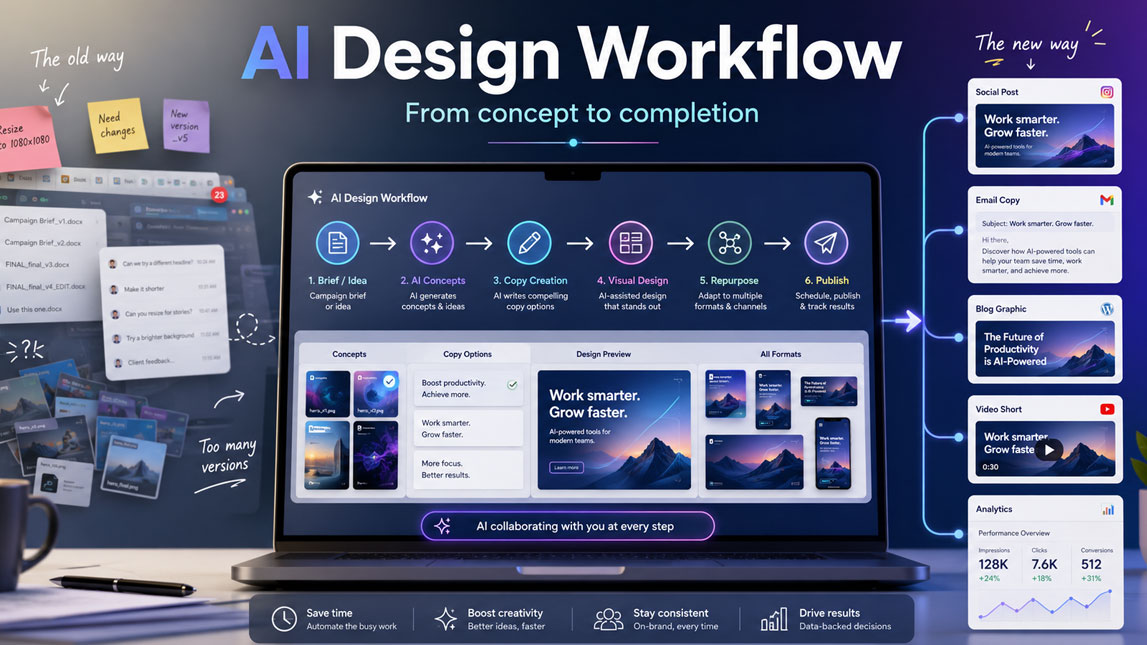
Last month, I watched a simple content campaign turn into a mess of tabs, drafts, resize requests, and “final_v7” files. The idea was good. The problem was the workflow. Too much manual work was sitting between the strategy and the finished assets.
That is exactly where an AI design workflow starts to make sense. Not as a magic button, and not as a replacement for taste, but as a practical way to move from concept to copy, visuals, variations, and publishing faster, without turning every piece of content into the same bland template.
The rise of AI in content creation and design
Content production used to feel like a long relay race. Someone drafted the copy, someone else created the visuals, another person resized assets for social, and then the whole thing came back with “small edits” that somehow changed half the project.
AI has not removed the need for creative work. It has changed where the effort goes.
The biggest shift is that teams no longer have to start from a blank page or blank canvas every time. A freelancer can generate campaign angles before opening a design tool. A marketer can turn one webinar into emails, carousels, short videos, and landing page sections. A SaaS founder can test visual directions without waiting three days for mockups.
That is where an ai design workflow becomes useful. It is not just “use AI to make images.” It is a connected process where strategy, copy, visuals, formatting, feedback, and publishing move faster because AI handles some of the heavy lifting.
The practical benefit is speed, of course. But speed alone is not enough.
The better advantage is momentum. When AI tools take care of repetitive decisions, creators have more space to judge the work, shape the message, and keep the brand consistent. I have noticed this most clearly in content teams that produce across several channels. The hard part is rarely creating one asset. The hard part is creating ten versions without making everything feel generic.
AI-assisted design helps with that pressure.
It can suggest creative routes, generate visual drafts, rewrite copy for different audiences, remove tedious formatting work, and help teams compare ideas before committing. Used well, AI becomes less like a shortcut and more like a production layer that keeps the creative process moving.
Understanding the AI design workflow: From concept to completion
An AI design workflow is the sequence of steps that turns an idea into finished creative assets with the help of AI tools. The exact setup depends on the team, but the core pattern is usually the same: define the goal, generate concepts, produce drafts, refine assets, adapt formats, and publish.
The mistake I see often is treating AI as a random tool you open when you are stuck. That can help occasionally, but it does not create a reliable system. A real ai creative workflow gives each tool a clear role. One tool helps with research, another with copy, another with image direction, another with layout, and another with repurposing.
At the concept stage, AI can help turn loose ideas into sharper creative directions. Instead of asking, “What should we post this week?”, a marketer can feed AI the campaign goal, audience segment, offer, and brand voice. The output might include angles, hooks, content pillars, objections to address, and visual themes.
Then comes drafting.
This is where an ai content design workflow starts to feel practical. Copy tools can generate headline variations, captions, ad copy, email snippets, and landing page blocks. Image tools can create moodboards, hero graphics, product scenes, thumbnail concepts, and background styles. Layout tools can organize content into templates for carousels, reports, presentations, or social posts.
A simple workflow often looks like this:
- Start with a campaign brief that defines the audience, objective, channel, and offer.
- Use AI to generate creative angles, visual directions, and message variations.
- Create first drafts of copy, images, layouts, or video scenes using specialized tools.
- Review everything against brand rules, factual accuracy, and audience fit.
- Resize, repurpose, and schedule the final assets across the right channels.
The review stage matters more than people want to admit. AI can move quickly, but it does not understand your brand in the same way your team does. It may produce polished work that is slightly off, too generic, too dramatic, or visually inconsistent.
That is why the human role shifts from “manual creator” to “creative director.” You are not just accepting outputs. You are selecting, editing, combining, rejecting, and improving them.
A useful workflow also includes feedback loops. After publishing, performance data should feed back into the next round. Which hooks got clicks? Which visual style made people stop scrolling? Which landing page section converted better? AI becomes much more valuable when it learns from actual results, not just assumptions.
Here is a simple way to map the stages:
| Stage | AI role | Human role |
|---|---|---|
| Ideation | Generate angles | Choose direction |
| Drafting | Create first versions | Edit for quality |
| Design | Suggest visuals | Protect brand fit |
| Repurposing | Adapt formats | Check context |
| Publishing | Assist scheduling | Review performance |
The workflow is not about replacing taste. It is about reducing friction so taste can be applied earlier and more often.
Key AI tools and design automation for enhanced content production
The best AI tools for content creation usually solve one specific bottleneck. Some help you think faster. Some help you design faster. Others help you turn finished assets into multiple formats without repeating the same manual steps.
For content teams, the smartest approach is not to collect every shiny app. That gets messy fast. A better starting point is to identify the slowest part of your current production process, then add AI there first.
Tools by production function
AI writing assistants are often the first layer. They can help with outlines, hooks, social captions, ad variations, video scripts, newsletter drafts, and product messaging. For marketers, they are especially useful when one idea needs to become several channel-specific versions. A LinkedIn post, email subject line, short video script, and landing page intro should not sound identical, but they can come from the same strategic input.
Image generation tools cover another major part of the workflow. They can create campaign concepts, product scenes, blog visuals, moodboards, illustrations, thumbnails, and ad creatives. For publishers, AI workflows for affiliate blog visuals and featured images can make recurring image production faster while keeping formats and visual direction more consistent across articles. These tools are powerful, but they still need direction.
A vague prompt usually gives vague results. A stronger prompt includes the format, audience, mood, brand style, subject, composition, and use case.
Design automation tools sit between creativity and production. They help with templates, resizing, batch asset creation, brand kits, social media variations, and recurring layouts. This is where small teams can save a surprising amount of time. No one enjoys manually resizing the same asset for five platforms. Well, almost no one.
Video AI tools are also becoming part of the standard stack. They can generate captions, cut long videos into clips, remove silences, create summaries, suggest hooks, and produce simple motion assets. For creators and SaaS teams, this is useful because video content often has the highest production drag.
Content optimization tools complete the loop. They help analyze readability, SEO structure, engagement signals, conversion elements, and audience fit. They are not glamorous, but they make the workflow more reliable.
Here is a practical overview:
| Tool category | Best use | Common output |
|---|---|---|
| Writing AI | Draft copy | Posts, emails, scripts |
| Image AI | Create visuals | Graphics, scenes, concepts |
| Design automation | Scale formats | Templates, resized assets |
| Video AI | Edit faster | Clips, captions, summaries |
| Optimization AI | Improve performance | SEO, CRO, readability |
The real magic happens when these categories connect. A blog post becomes a carousel. The carousel becomes a short video. The video becomes a newsletter snippet. The newsletter becomes a sales page idea. One idea travels further, and the team does not have to rebuild it from scratch every time.
Where automation helps most
Design automation tools are especially useful for repeated patterns. If your team creates weekly reports, product launch graphics, social media campaigns, paid ads, or educational carousels, automation can remove a lot of production fatigue.
A good automation setup might pull copy from a content brief, place it into approved templates, generate image options, resize the final assets, and organize everything into folders by campaign.
For teams publishing across several platforms, AI workflows for creating social media content at scale can extend this process to recurring posts, platform-specific variations, and larger content batches without rebuilding every asset manually. For a solo creator, that might sound advanced. In practice, even a simple version saves time.
The most useful automation points are usually:
- Generating multiple headline, caption, and CTA variations for testing.
- Applying brand colors, fonts, and layouts across recurring content formats.
- Creating social media size variations from one approved design.
- Turning long-form content into short-form assets for different platforms.
- Organizing drafts, approvals, and final files inside a repeatable system.
Still, automation has a limit. It should not flatten your creative judgment. If every asset looks like it came from the same template with slightly different text, people notice. The best AI workflow for marketers keeps automation in the repetitive layer and leaves strategic choices to humans.
A useful test is simple: does this automation remove busywork, or does it remove thinking?
If it removes busywork, keep it. If it removes thinking, slow down.
Crafting an effective AI workflow for marketers and creative teams
Building an AI workflow is less about tools and more about decisions. Before choosing software, you need to know what your team creates repeatedly, where projects slow down, and which parts need human approval every time.
Start with your current process. Not the ideal process in a polished Notion doc. The real one. Where do people wait? Where do revisions pile up? Which tasks get delayed because nobody wants to do them? Those friction points are usually the best places to introduce AI.
For many marketing teams, the bottleneck appears in one of three places: coming up with enough ideas, adapting content for multiple channels, or getting designs approved quickly. Each one needs a different AI layer.
Build from the brief
A strong ai design workflow begins with a strong brief. Weak inputs create weak outputs, and no tool can fully fix that. The brief should tell AI what the content is for, who it is for, what action it should drive, and what the brand should sound and look like.
A practical creative brief can include:
- The campaign goal, such as awareness, lead generation, activation, or retention.
- The target audience, including pain points, objections, and level of awareness.
- The main message, offer, or product feature being promoted.
- The channels where the final assets will be published.
- The brand rules for tone, visuals, claims, and formatting.
This is one of the few places where taking extra time saves time later. A vague brief creates more editing. A detailed brief makes the AI output easier to judge.
A useful prompt placeholder for the first stage could be:
Once the brief is clear, the workflow becomes easier to repeat. You can create templates for launch campaigns, newsletters, paid ads, SEO content, social posts, and onboarding content. Instead of reinventing the process each week, you improve the system.
Create approval checkpoints
AI can generate a lot of assets quickly, which sounds wonderful until the team has to review 47 versions of the same concept. More output is not always more progress.
Approval checkpoints keep the workflow sane.
The first checkpoint should happen after concept generation. Before anyone creates final visuals, choose the strongest direction. The second checkpoint should happen after draft production, when copy and design come together. The final checkpoint should focus on accuracy, brand consistency, accessibility, and channel fit.
For marketers, this matters because AI-generated content can look finished before it is strategically ready. A polished ad creative may still have a weak promise. A beautiful image may not match the buyer’s problem. A catchy hook may attract the wrong audience.
I like to separate review into three questions:
| Review question | What it protects |
|---|---|
| Is it accurate? | Trust and credibility |
| Is it on-brand? | Consistency and recognition |
| Is it useful? | Audience relevance |
That small review habit prevents a lot of messy publishing.
Collaboration also needs structure. If designers, writers, marketers, and founders all use AI differently, the workflow can become chaotic. One person prompts in a detailed way, another uses quick guesses, and another edits outputs without documenting what changed.
A shared prompt library helps. So does a shared folder structure, naming convention, and approval board. Not exciting, I know. But this is the quiet infrastructure that makes AI useful beyond a few experiments.
The workflow should also leave room for human taste. AI might generate ten layouts, but someone still needs to know which one feels right for the audience. It might produce twenty hooks, but someone has to choose the one that matches the campaign promise.
For a lean team, a simple operating rhythm works best: brief on Monday, concepts on Tuesday, drafts on Wednesday, review on Thursday, publish or schedule on Friday. The exact timing can change, but the sequence keeps everyone aligned.
The point is not to make creativity rigid. It is to remove the chaos around it.
Practical AI content design workflow examples across industries
AI design workflows become easier to understand when you place them inside real production situations. Different industries need different outputs, but the pattern stays familiar: strategy first, AI-assisted production second, human review before publishing.
A SaaS team, for example, might use an ai content design workflow to promote a new feature. The marketer starts by feeding the product notes, customer pain points, and positioning into an AI writing tool. The tool generates launch angles, email copy, social posts, and website section ideas. Then an image or design tool creates product-led visuals, such as dashboard mockups, feature illustrations, or comparison graphics.
The final workflow might produce a launch email, three LinkedIn posts, one blog graphic, two ad variations, and a short demo video script from the same source brief. That is a serious production lift without turning the team into a content factory.
An ecommerce brand would use a different version. The workflow could start with customer reviews, product benefits, seasonal trends, and campaign goals. AI helps extract common objections and emotional triggers. Design tools then create product scenes, promotional banners, and social creatives. A video AI tool can turn product photos into short motion assets for ads or stories.
For agencies, the benefit is often consistency. A small creative team can build repeatable workflows for client reports, campaign concepts, ad variations, and monthly content batches. The agency still owns strategy and client taste, but AI reduces the grind of first drafts and formatting.
Here are a few industry patterns:
| Industry | Workflow focus | Content outputs |
|---|---|---|
| SaaS | Feature education | Emails, ads, demos |
| Ecommerce | Product promotion | Banners, videos, posts |
| Coaching | Authority building | Carousels, newsletters, reels |
| Agencies | Client delivery | Reports, concepts, creatives |
| Media brands | Content repurposing | Clips, graphics, summaries |
A creator or coach might use AI in a more personal way. They could record a voice note after a client call, turn it into a content outline, then use an AI workflow to repurpose one idea into multiple visuals, from carousel slides and quote graphics to other channel-specific assets.
The same source material could then be adapted into a newsletter without starting from scratch.The content still comes from lived experience, which is important. AI just helps package it.
Media brands usually care about volume and speed. A podcast episode can become short clips, quote graphics, summary posts, newsletter sections, and search-friendly article drafts. Without AI, that process can take hours. With a clean workflow, it becomes much more manageable.
The best examples share one trait: they do not ask AI to invent the entire strategy. They give AI strong raw material.
That raw material can be customer research, sales calls, product notes, expert opinions, analytics, or original interviews. When the input has substance, the output feels sharper. When the input is thin, AI tends to produce the kind of content everyone has already seen.
Future trends and best practices in AI-powered content design
AI-powered content design is moving toward more connected workflows. Instead of separate tools for writing, images, layout, video, and publishing, more platforms are starting to behave like creative operating systems. You give the system a campaign goal, and it helps generate the assets, variations, formats, and performance suggestions.
That sounds exciting. Also slightly dangerous, depending on how casually it is used.
The next wave will likely focus on personalization, brand memory, multimodal creation, and automated testing. AI tools will get better at understanding a company’s style, previous campaigns, audience segments, and performance data. Marketers will be able to generate campaign variations for different personas without rebuilding everything manually.
Multimodal workflows will also become normal. Text, image, video, audio, and layout will blend into the same process. A founder might record a quick product explanation and turn it into a landing page draft, social graphics, video snippets, and email copy in one workflow.
The opportunity is huge, but the best practices become more important, not less.
Strong teams will need clear rules for accuracy, disclosure, brand safety, and originality. AI can accidentally create misleading claims, generic visuals, biased assumptions, or content that feels too close to existing styles. Human review is not a formality. It is the quality layer.
A few habits will keep AI design workflows useful over the long term:
- Keep a documented brand system with tone, visual rules, examples, and banned claims.
- Review AI outputs for accuracy, originality, accessibility, and audience fit.
- Use performance data to improve prompts, templates, and creative directions.
- Protect human insight by feeding AI real research, not generic instructions.
- Update workflows regularly as tools, channels, and audience expectations change.
The teams that benefit most will not be the ones using the most tools. They will be the ones with the clearest process.
A good ai design workflow should make content production faster without making the work feel disposable. It should help marketers test more ideas, designers avoid repetitive formatting, and creators turn strong thinking into more usable formats.
Speed is useful. Taste still matters. The future belongs to teams that can combine both without losing their voice.
A strong AI design workflow is not about producing more content for the sake of it. It is about removing the slow, repetitive work that keeps good ideas stuck in drafts, while leaving enough space for strategy, taste, and human judgment.
For marketers, freelancers, and lean creative teams, that balance matters. The tools will keep changing, but the real advantage will come from building workflows that help you move faster without losing the point of the work: creating content that feels useful, clear, and worth paying attention to.
FAQ
What is an AI design workflow?
An AI design workflow integrates artificial intelligence tools and processes into the various stages of content creation, from ideation and drafting to visual design and optimization, to enhance efficiency and creativity.
How can AI design workflows speed up content production?
AI design workflows accelerate content production by automating repetitive tasks, generating initial drafts or design concepts, assisting with research, optimizing visuals, and providing data-driven insights, significantly reducing manual effort and time.
What types of AI tools are best for content creation?
The best AI tools for content creation include AI writing assistants, image generators, video editing AI, design automation platforms, content optimization tools, and AI-powered research assistants, each streamlining different aspects of the production process.
Are AI design workflows suitable for marketers?
Absolutely. AI design workflows are highly beneficial for marketers, enabling them to produce high-quality content faster, personalize campaigns, analyze performance, and free up time for strategic thinking and creative oversight.
What are the key benefits of integrating AI into design processes?
Key benefits include increased speed and efficiency, enhanced creativity through AI-generated ideas, cost reduction, improved content quality and consistency, better personalization, and data-driven decision-making.

Artificial Intelligence Specialist | AI-Driven Workflow Strategist