A lead comes in while you are handling a client call, fixing a landing page, or trying to ship the next product update. You plan to follow up “in a minute,” then the day gets noisy. By the time you open the CRM, the best prospect in your pipeline has already gone cold.
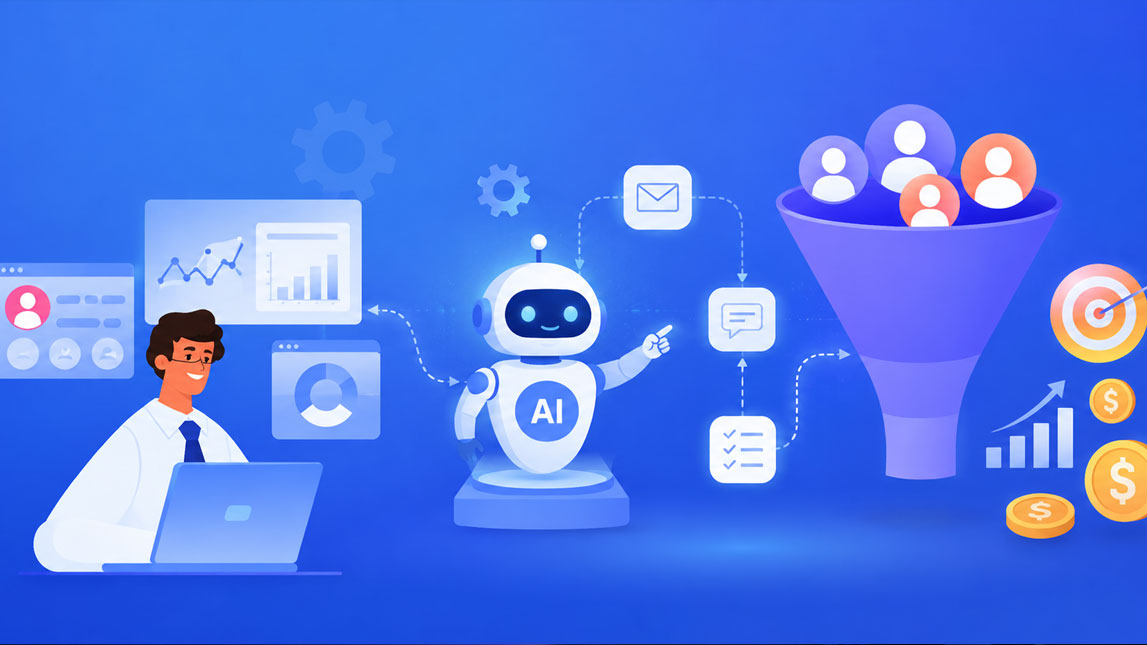
That is the quiet problem an AI sales automation workflow is meant to solve. It helps you capture, qualify, route, and nurture leads without turning your sales process into a messy chain of reminders, spreadsheets, and manual checks.
For small teams, this is not about replacing real conversations. It is about making sure the right conversation happens faster, with better context, and fewer dropped opportunities.
The imperative for AI in sales and lead management
Manual sales management looks harmless when the pipeline is small. A form submission arrives, someone checks the CRM, another person sends a follow-up, and a founder or sales rep decides whether the lead is worth chasing.
Then volume increases.
Suddenly, good prospects sit untouched for two days. Low-intent leads get too much attention. Sales notes live across inboxes, Slack threads, spreadsheets, and CRM fields that nobody updates consistently. I have seen this happen in small teams that were not “bad at sales” at all. They simply outgrew their manual system.
That is where an AI sales automation workflow starts to make sense. Not as a magic replacement for sales judgment, but as a layer that helps teams move faster, prioritize better, and stop relying on memory.
For freelancers, SaaS builders, marketers, and lean GTM teams, the real challenge is not just getting more leads.
It is handling the leads already coming in with enough speed and context to convert them.
AI helps by turning scattered lead data into action. It can detect buying signals, summarize conversations, assign leads to the right person, recommend the next step, and trigger follow-ups without someone babysitting every task.
This connects directly to the broader idea of using AI workflow automation across small business operations. Sales is one of the clearest use cases because every delay has a visible cost. A missed follow-up is not just an operational mistake. It can be lost revenue.
Deconstructing the AI sales automation workflow: From inception to conversion
An AI sales automation workflow is a connected system that uses AI to manage sales tasks from lead capture to deal progression. The workflow usually combines your CRM, forms, enrichment tools, email platform, calendar, chatbot, and internal notifications.
The point is not to automate everything blindly.
The point is to let AI handle the repetitive analysis and coordination work, while humans focus on conversations, objections, negotiation, and trust.
A simple workflow often moves through these stages:
- Lead capture from forms, chatbots, landing pages, ads, webinars, or referrals.
- Lead enrichment using company data, job title, industry, size, location, or technology stack.
- AI lead qualification based on fit, behavior, intent, and sales-readiness.
- AI lead routing to the right rep, founder, account owner, or nurture sequence.
- Automated follow-up through email, CRM tasks, reminders, or chatbot engagement.
- Pipeline updates, conversation summaries, and next-step recommendations.
The workflow becomes more powerful when these stages are connected instead of treated as separate tools. A lead should not enter a form, wait in a spreadsheet, get copied into a CRM, and then depend on someone remembering to follow up. That is where friction quietly kills deals.
Here is a simplified view of where AI fits inside the sales workflow:
| Stage | AI role | Business result |
|---|---|---|
| Capture | Parse lead details | Cleaner intake |
| Enrich | Add context | Better segmentation |
| Qualify | Score intent | Sharper prioritization |
| Route | Assign owner | Faster response |
| Nurture | Personalize follow-up | Higher engagement |
| Close | Suggest next steps | Cleaner execution |
A practical example: someone fills out a demo request for a SaaS product. AI enriches the lead with company size, identifies that the person is a VP of Operations, checks that the company matches the ideal customer profile, gives the lead a high score, routes it to the enterprise sales rep, drafts a personalized email, and posts a summary in Slack.
One workflow. Several small decisions. Much less manual drag.
AI-powered lead qualification and scoring: Precision in prospecting
Lead qualification used to depend heavily on fixed rules. Company size above 50 employees? Good. Business email? Better. Requested a demo? Hot.
Those signals still matter, but they are not enough on their own.
AI lead qualification looks at a broader picture. It can combine firmographic data, behavioral activity, conversation history, campaign source, page visits, email engagement, and even language used in form responses. Instead of asking, “Does this lead match a basic rule?”, AI can estimate, “How likely is this person to become a real opportunity?”
That shift is useful because not all leads are equal, even when they look similar on paper.
What AI can score
An AI scoring model can evaluate several layers of intent and fit:
- Fit signals, such as role, company size, industry, budget range, or region.
- Behavior signals, such as pricing page visits, demo requests, webinar attendance, or repeat visits.
- Engagement signals, such as email replies, chatbot questions, downloaded resources, or booked calls.
- Negative signals, such as student emails, unsupported locations, tiny budgets, or irrelevant use cases.
The best systems do not only produce a number. They explain the reason behind it. A score of 92 is much more useful when the CRM also says, “Visited pricing page three times, requested enterprise demo, company has 120 employees, matches SaaS ICP.”
That explanation helps the sales team trust the system.
I would avoid treating AI scoring as permanent truth. Early models can be biased toward old assumptions, especially if your historical CRM data is messy. If your team prviously ignored a certain segment, the AI might learn that those leads are “low value” simply because nobody worked them properly.
A better approach is to treat lead scoring as a living system. Review won deals, lost deals, false positives, and ignored leads regularly. Over time, your AI sales automation workflow should become more precise because it learns from actual sales outcomes, not just guesswork.
Optimizing lead distribution with AI lead routing: Getting prospects to the right rep
Routing sounds simple until you have multiple products, regions, customer types, and sales reps with different strengths. Then “send every lead to the next available person” starts to feel a bit lazy.
AI lead routing helps match each prospect with the most suitable owner based on real criteria.
This might include territory, language, company size, product interest, account history, sales capacity, or even past conversion patterns…
For small teams, the “rep” might be the founder, a contractor, a customer success person, or a nurture workflow. The same principle applies: the lead should go where it has the best chance of receiving a useful response.
Routing logic that actually helps
A strong routing setup usually combines rules with AI judgment. Rules keep the system predictable. AI adds flexibility when the lead does not fit neatly into one box.
For example, a founder-led SaaS team might use this routing logic:
| Lead type | Routing action | Reason |
|---|---|---|
| Enterprise demo | Founder or senior rep | High-value opportunity |
| SMB trial | Nurture sequence | Lower-touch sales |
| Agency lead | Partner manager | Specific use case |
| Existing account | Account owner | Relationship continuity |
| Low fit | Automated education | Protect sales time |
Speed matters here. When a high-intent lead asks for a demo, waiting half a day because nobody noticed the form submission is painful. AI lead routing can trigger instant assignment, notify the owner, create a CRM task, and draft the first response.
That does not guarantee a close.
It does remove a very common reason deals go cold.
For more advanced GTM teams, agent-based systems can go further by researching accounts, preparing outreach context, and coordinating multi-step actions.
That is where a tool-focused workflow like building sales and GTM agents with Relevance AI becomes relevant, especially when simple CRM automation starts to feel too limited.
Beyond leads: Automating sales nurturing and engagement
Lead management does not stop after qualification and routing. In many businesses, the real money is in the follow-up.
A prospect may not be ready today. They may need internal approval, more education, a comparison with competitors, or a reminder after a trial period. Without automation, those moments depend on someone remembering at exactly the right time. Spoiler: they often do not.
Sales workflow automation helps keep the conversation alive without making every message feel like a generic drip campaign.
AI can personalize nurturing based on behavior and context. Someone who visited the pricing page twice should not receive the same message as someone who downloaded a beginner guide. A lead asking about integrations needs different content from a lead comparing plans.
Personalization without sounding fake
The risk with AI-generated engagement is obvious. Bad automation sounds like bad automation.
The fix is to use AI for relevance, not fake intimacy. Let it summarize context, suggest talking points, segment leads, and draft messages. Keep the human review layer for high-value conversations.
Useful nurturing automations include:
- Sending a tailored follow-up after a demo request or pricing page visit.
- Triggering educational emails based on the lead’s use case or industry.
- Creating reminders when a lead opens several emails but does not reply.
- Using chatbots to answer common sales questions and collect missing details.
- Summarizing previous touchpoints before a sales call.
A nice workflow I like for lean teams is simple: AI summarizes the lead’s behavior, drafts a short follow-up, and asks for approval before sending. It saves time, but the rep still controls the tone.
For pipeline-heavy teams, structured databases can also help. If your leads, campaigns, content assets, and sales statuses live in one organized workspace, it becomes easier to automate cleanly. That is why organizing AI-powered lead pipelines in Airtable can be a useful supporting layer for teams that are not ready for a heavyweight CRM setup.
Implementing your AI sales automation workflow: Tools and strategic considerations
The best AI sales automation workflow is not always the most complex one. In fact, the teams that get the most value usually start with one painful bottleneck and automate that first.
Maybe leads are not being qualified fast enough. Maybe routing is messy. Maybe follow-up depends too much on one busy founder. Start there.
Trying to automate the entire sales process in one sprint usually creates a brittle system nobody trusts.
Start with the workflow map
Before choosing tools, map the current path of a lead. Where does it come from? Who sees it first? What data is missing? When does follow-up happen? Where do deals stall?
This exercise is boring in the best possible way. It exposes the exact places where AI can help.
A practical implementation path could look like this:
- Audit your current lead sources, CRM fields, and follow-up steps.
- Define what makes a lead qualified, unqualified, urgent, or nurture-ready.
- Choose one automation point, such as scoring, routing, or follow-up drafting.
- Connect your CRM, form tool, inbox, and notification channels.
- Test the workflow with real leads before fully trusting automation.
- Review performance weekly and adjust scoring or routing rules.
Tool choice depends on your stack. A SaaS team might use HubSpot, Salesforce, or Pipedrive as the CRM, with AI enrichment and automation layered on top.
A freelancer or indie maker might use Airtable, Notion, Make, Zapier, or n8n to build a lighter system.
The tool matters less than the data structure.
If your CRM fields are inconsistent, your AI will struggle. If every lead source uses different naming conventions, routing becomes unreliable. If sales reps do not update deal outcomes, the scoring model has weak feedback.
Clean data is not glamorous. It is the foundation.
Here is a simple decision table for choosing where to begin:
| Problem | Best first automation | Why it helps |
|---|---|---|
| Slow replies | Instant routing | Reduces delays |
| Too many leads | AI scoring | Protects focus |
| Messy CRM | Data cleanup | Improves accuracy |
| Weak follow-up | Email automation | Keeps momentum |
| Low visibility | Pipeline summaries | Supports decisions |
One useful prompt for planning your workflow:
Use prompts like that during planning, not as a replacement for strategy. AI can help you see patterns, but you still need to decide what kind of sales experience you want to create.
The tangible impact: How AI transforms sales performance
A good AI sales automation workflow improves sales performance in several practical ways. It gives reps more time, gives managers better visibility, and gives prospects faster, more relevant communication.
The first impact is efficiency. Teams spend less time copying data, checking inboxes, updating fields, and deciding who should handle what. Those little tasks feel minor individually, but together they eat a surprising amount of sales energy.
The second impact is prioritization. AI lead qualification helps teams focus on leads with stronger fit and intent instead of treating every contact as equal. That matters a lot when resources are limited. A solo founder or small team cannot chase everything.
Response time also improves. With AI lead routing, high-intent leads can be assigned immediately, with context attached. The rep does not start from a blank screen. They know who the lead is, why they matter, and what to say next.
Customer experience gets better too, assuming the automation is thoughtful. Prospects receive faster answers, more relevant resources, and fewer awkward handoffs.
Nobody enjoys explaining their needs three times because the sales system lost context somewhere between the form and the CRM.
The bigger shift is decision-making. Once your workflow tracks lead quality, routing speed, follow-up timing, and conversion outcomes, sales becomes less dependent on gut feeling.
You can see which channels bring serious buyers, which segments convert, and where deals slow down.
That is when AI stops feeling like a productivity trick and starts becoming part of the revenue system.
For small teams, this is the real advantage: not replacing the human side of sales, but giving it better timing, cleaner context, and fewer dropped balls.
AI will not fix a broken sales process on its own, but it can make a clear one move much faster. When lead capture, qualification, routing, and follow-up work together, your team spends less time chasing admin and more time having the conversations that actually move deals forward.
The best place to start is usually the part of your workflow that feels most repetitive or easiest to drop. Automate that first, watch what improves, and let the system grow from there.

Artificial Intelligence Specialist | AI-Driven Workflow Strategist